Webflow Pricing Guide: Every Plan, Seat, and Add-On Explained
Webflow pricing tiers fall into four groups: site plans, workspace plans, seats, and add-ons. Site plans come in two kinds, general site plans for websites and ecommerce site plans for online stores. What you pay depends on how many sites you publish, whether you sell online, and how many people build with you.
How Webflow Pricing Works: Site Plans vs. Workspace Plans
As for Webflow pricing for site plans and workspace plans, the two bills are independent. Any workspace plan, including the free one, can hold an unlimited number of paid site plans, so a freelancer on a free workspace can still run five live client sites.
Every site in Webflow is inside a workspace, and every customer gets a free Starter workspace plan and a free Starter site plan when they sign up. You pay for a Webflow site plan when a site needs to go live on a custom domain, and for a workspace plan when your team needs more staging, custom code or control over publishing.
The table below shows where each of the Webflow pricing tiers starts:
| Plan family | Plans | Starts at (yearly) | Billed per |
|---|---|---|---|
| General site plans | Starter, Basic, Premium, Team, Enterprise | Free | Site |
| Ecommerce site plans | Standard, Plus, Advanced | $29/mo | Store |
| Workspace plans | Starter, Core, Growth, Freelancer, Agency | Free | Workspace |
| Seats | Full, Limited, Free | Free | Person |
| Add-ons | Localize, Analyze, Optimize, bandwidth | $9/mo | Site |
The prices are sourced from Webflow's pricing page and subject to change.
Webflow Site Plans
Every Webflow site runs on a site plan, and we can distinguish two kinds:
- General site plans
- Ecommerce site plans
General Site Plans
General Webflow site plans cover every site that doesn't sell products. Starter, Basic and Premium are self-serve and priced per site, while Team and Enterprise sit above them for larger organizations.
#1. Starter
Webflow Starter site plan is free and includes:
- A webflow.io domain
- 2 static pages
- 50 CMS items across up to 20 Collections
- 1 GB of bandwidth a month
- 50 form submissions
#2. Basic
Webflow Basic site plan costs $15 a month billed yearly or $25 billed monthly. The plan aims at simple sites that don't need a CMS and covers:
- A custom domain
- 300 static pages
- 10 GB of bandwidth a month
- Unlimited form submissions
- Password protection
The downside is the CMS. Since the plan doesn’t include one, a blog, a case study library, or a job board needs Premium.
#3. Premium
Webflow Premium site plan costs $25 a month billed yearly or $39 billed monthly, and it's built for content-heavy sites with real traffic. The plan includes everything in Basic, plus:
- Webflow CMS, with 20,000 CMS items across 40 Collections
- 50 GB of bandwidth a month, which you can raise to 2.5 TB
- Code components
- Site search
- Form file uploads
- Well-known files
For a B2B marketing site with a blog, Premium is the plan you'll end up on.
#4. Team
Webflow Team site plan costs $2,500 a month on an annual contract and it’s suited for growing teams that need more control without extra complexity. Webflow groups Team and Enterprise as platform plans, because each one bundles a site, a workspace, seats and add-ons into one contract. It includes everything in Premium, plus:
- Webflow Localize with 2 locales
- 5 Full seats and 5 Limited seats, plus up to 100 Free seats
- 100,000 AI credits a year
- AEO agents for search and AI answer engines
- Publishing workflows and single-page publishing
- A site activity log with API access
- 24/7 priority support
#5. Enterprise
Webflow Enterprise has no listed price, so the figure comes from a conversation with Webflow's sales team. It includes everything in Team, plus:
- Granular permissions and custom roles
- Single sign-on (SSO) and SCIM user provisioning
- A dedicated account manager
- 99.99% hosting uptime, against 99.00% on Team
- Custom billing, MSAs and SLAs
Ecommerce Site Plans
A store on Webflow buys an ecommerce plan in place of a regular site plan, priced per store. Each one includes hosting, the CMS, and a custom checkout. Stripe and PayPal processing fees apply on top of every plan.
#1. Standard
Webflow Standard ecommerce plan costs $29 a month billed yearly or $42 billed monthly, for stores that are just getting started. The plan includes:
- 500 ecommerce items
- A 2% Webflow transaction fee
- 2,000 CMS items
- 50 GB of bandwidth
- 3 staff accounts
#2. Plus
Plus costs $74 a month billed yearly or $84 billed monthly, for stores with higher volume. With that said, here's what the Webflow Plus ecommerce plan covers:
- 5,000 ecommerce items
- No Webflow transaction fee
- Unbranded store emails
- Up to 10,000 CMS items
- 100 GB of bandwidth
- 10 staff accounts
Once a store sells more than about $2,250 a month, the 2% fee on Standard costs more than the $45 monthly gap to Plus.
#3. Advanced
Webflow Advanced ecommerce plan costs $212 a month billed yearly or $235 billed monthly, for large catalogs, and it includes:
- 15,000 ecommerce items
- No Webflow transaction fee
- Unbranded store emails
- Up to 10,000 CMS items
- 100 GB of bandwidth
- 15 staff accounts
Webflow Workspace Plans
Every Webflow account comes with a free Starter workspace, and paid workspace plans add staging sites, custom code, and collaboration controls. Webflow sells them in two families:
- Core and Growth for in-house teams
- Freelancer and Agency for people who build sites for clients

Starter
Webflow Starter workspace plan is the free workspace every customer gets, and it can hold unlimited paid sites. Here's what the workspace plan includes:
- 2 staging sites, with 2 pages per staged site
- 1 Full seat for the workspace owner
- 200 AI credits a month
- Up to 2 agency or freelancer guest teams of 5 people
- 1 free client seat per paid site
Core
Webflow Core workspace plan costs $19 a month billed yearly or $28 billed monthly, and Webflow pitches it "for more staging needs." The plan covers:
- 10 staging sites, with 300 pages per staged site
- Custom code
- Code export to HTML and CSS
- One Shared Library
- 300 AI credits a month
Growth
This plan costs $49 a month billed yearly or $60 billed monthly, for teams that need unlimited staging and tighter control. Here's what the Webflow Growth workspace plan includes, on top of Core:
- Unlimited staging sites
- Password protection and 301 redirects on staged sites
- Site-specific access and site-level roles
- Publishing permissions
- 400 AI credits a month
Freelancer
Webflow Freelancer workspace plan costs $16 a month billed yearly or $24 billed monthly, and Webflow aims it at freelancers with a small client roster. The workspace plan includes:
- 10 staging sites
- Free guest access in client workspaces
- 1 free client seat per site
- Client payments, so clients pay for their own site plans
- 300 AI credits a month
Agency
Agency costs $35 a month billed yearly or $42 billed monthly, for agencies with a large client roster. Here's what the Webflow Agency workspace plan includes, on top of Freelancer:
- Unlimited staging sites
- 3 free client seats per site
- Unlimited Shared Libraries
- Site-level roles and publishing permissions
- 400 AI credits a month
Webflow Seats and AI Credits
Webflow seats are split by what people do:
- Full seats design whole sites and manage settings
- Limited seats edit content and build pages from existing components
- Free seats can only review and comment
Every Webflow workspace includes one Full seat for the owner, and you pay for each extra person who designs or edits. A Full seat costs $39 a month billed yearly or $45 monthly, a Limited seat costs $15 or $19, and a Free seat for reviewers costs nothing. Agency and freelancer guests and client seats don't use paid seats at all.
Getting the mix right is the cheapest saving in Webflow pricing. For instance, a writer who only publishes blog posts on a Limited seat costs $180 a year instead of $468 on a Full one. The steps for inviting collaborators to a Webflow workspace differ for each seat type.

AI credits come with every workspace plan and are shared across all sites:
- 200 a month on Starter
- 300 on Core and Freelancer
- 400 on Growth and Agency
If a workspace runs out, a pack of 2,000 extra credits a month costs $20 billed yearly or $25 billed monthly.
Webflow Add-Ons
Webflow add-ons attach to a paid site plan and are priced by usage. Each one is billed per site, on top of the site plan.
Localize
Localize translates a site into other languages and comes in two tiers:
- Essential costs $9 a month per locale billed yearly ($12 monthly), for up to 3 locales and 10,000 translated words per locale each month.
- Advanced costs $29 ($35 monthly) per locale, for up to 10 locales, 50,000 words per locale, localized URLs and automatic visitor routing.
Analyze
Analyze is Webflow's built-in analytics, starting at $9 a month billed yearly ($12 monthly) for 2,000 sessions a month. The price steps up with traffic, to a top self-serve tier of 500,000 sessions a month. It tracks page views, sessions, visitors and clicks, and it works with consent management tools.
Optimize
Optimize runs A/B tests and personalization, starting at $299 a month billed yearly ($379 monthly) for 25,000 page views a month. The self-serve tiers go up to 500,000 page views and allow up to 5 tests running at once. Optimize is the one add-on where the price outweighs the site plan many times over, so it pays off once a site has enough traffic for tests to reach a result.
Extra Bandwidth
Premium sites can buy more bandwidth when traffic grows past the included 50 GB. The smallest step adds 50 GB for $20 a month billed yearly ($30 monthly), and the largest adds 2.45 TB for $974 ($1,460 monthly). Webflow also sells Campaigns, a landing page and ad tool for marketing teams, from $2,000 a month.
How to Choose the Right Webflow Plan
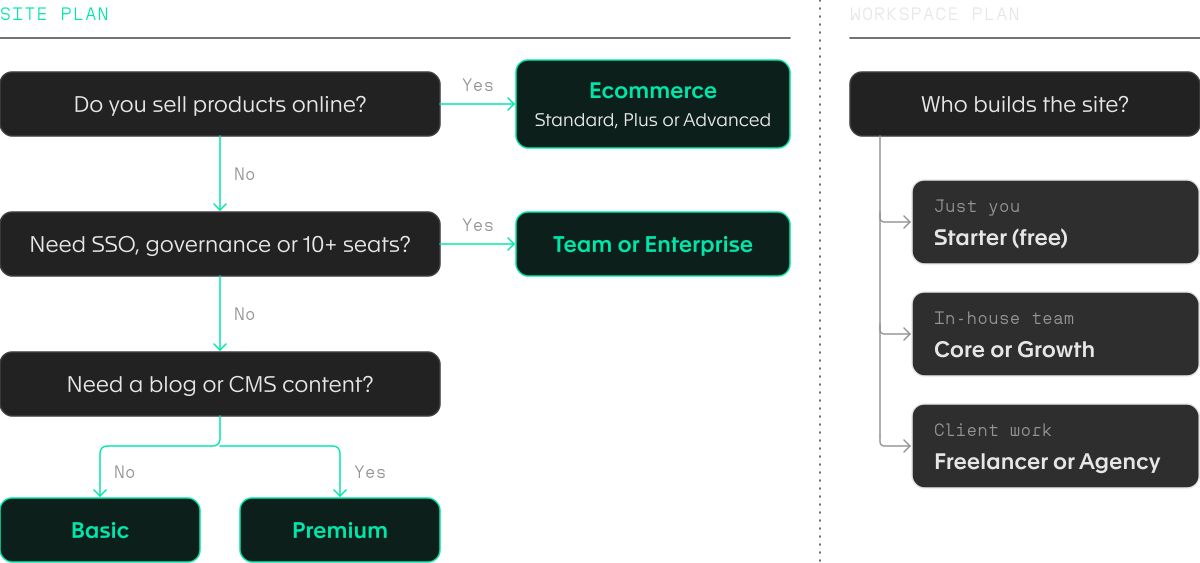
To choose the right Webflow plan, answer four questions in order. The first three pick the site plan, based on whether you sell online, how much control your organization needs, and whether the site runs on CMS content. The fourth picks the workspace plan, based on who builds the site.
- Do you sell products online? If yes, pick an ecommerce site plan: Standard for a new store, Plus once the 2% fee on Standard costs more than the price gap, and Advanced for catalogs over 5,000 items.
- Do you need SSO, governance or ten or more seats? If yes, talk to Webflow about Team or Enterprise, since both bundle the site, workspace and seats into one contract.
- Does the site need a blog or other CMS content? If not, Basic covers it. If it does, Premium is the plan.
- Who builds the site? Solo builders stay on the free Starter workspace, in-house teams choose Core or Growth, and freelancers and agencies choose Freelancer or Agency.
Conclusion
Webflow pricing comes down to two bills and a few extras. The site plan covers each live site, and you choose it by content: Basic for static sites, Premium once you need the CMS, and an ecommerce plan if you sell.
The workspace plan covers the people and staging behind those sites, from the free Starter workspace to Agency. Seats and add-ons sit on top, and the seat mix is the easiest saving, since a Limited seat costs less than half a Full one.
Can you cancel a Webflow plan at any time?
Yes, you can cancel any Webflow site plan or workspace plan at any time, but you still pay the rest of the term you signed up for. On yearly billing that means the plan stays active, and billed, until the year runs out, so cancelling early doesn't bring the cost down.
What happened to the Webflow CMS and Business plans?
Webflow merged the CMS and Business site plans into Premium on May 13, 2026. Existing sites switch at renewal from June 29, 2026, or follow from November 16, 2026 in Freelancer and Agency workspaces.
How many workspaces can you have in Webflow?
You can create as many Webflow workspaces as you need, but each customer gets only one free workspace. Teams use separate workspaces to keep client projects or business units apart, and each extra workspace needs its own paid workspace plan.
Can you host a Webflow site somewhere else?
Yes, any paid workspace plan lets you export a site's HTML and CSS and host it elsewhere, with no attribution needed. CMS content has to be exported collection by collection, forms stop working, and exported code can't be imported back into Webflow, so the export works best for static sites.
Does Webflow charge transaction fees on ecommerce sales?
Webflow charges a 2% transaction fee on the Standard ecommerce plan and no transaction fee on Plus or Advanced. Payment processing fees from Stripe or PayPal apply on every plan, on top of any Webflow fee. A store on Standard pays both, so the real cost of a $100 order there is the processing fee plus $2 to Webflow.
Do Webflow prices include tax?
No, Webflow lists every price in U.S. dollars before tax, and applicable taxes such as VAT are added at checkout. A European business on Premium at $25 a month billed yearly will see a higher final charge, depending on its country's VAT rate.
How much does the Webflow certification exam cost?
The Webflow Practitioner Certification exam costs $100. Some countries and regions add taxes such as VAT on top. The exam is separate from any site or workspace plan, so you don't need a paid plan to take it, and passing it is how freelancers and agencies show clients they know the platform.


Your growth starts with one conversation.
No pitch deck. No pressure. A focused 30-minute call about where you are, where you want to be, and whether we're the right team to get you there.