Webflow Site Plans: Types, Prices, and Billing
A Webflow site plan pays for one live website, covering a custom domain, hosting, and bandwidth. Webflow offers general site plans (Starter, Basic, and Premium), ecommerce plans (Standard, Plus, and Advanced), and platform plans (Team and Enterprise). Prices go from free to $2,500 a month billed yearly, and Enterprise is priced by Webflow's sales team.
What Is a Webflow Site Plan?
A Webflow site plan is the per-site subscription that lets a site publish to a custom domain and pays for the hosting. Every new site starts on the free Starter plan, which publishes only to a webflow.io subdomain, so you need a paid site plan when moving to your own domain.
Also, the Webflow site plan sets the site's limits:
- How many static pages it can have
- How many CMS items it can hold
- How much bandwidth it can use each month
- How many form submissions it can collect
One Webflow site plan covers one site, serving it through a global CDN, which routes each visitor to the nearest server. All prices are per site, with applicable taxes added at checkout, which means three websites need three site plans even when they are in the same Webflow workspace.
Webflow Site Plan Types and Prices
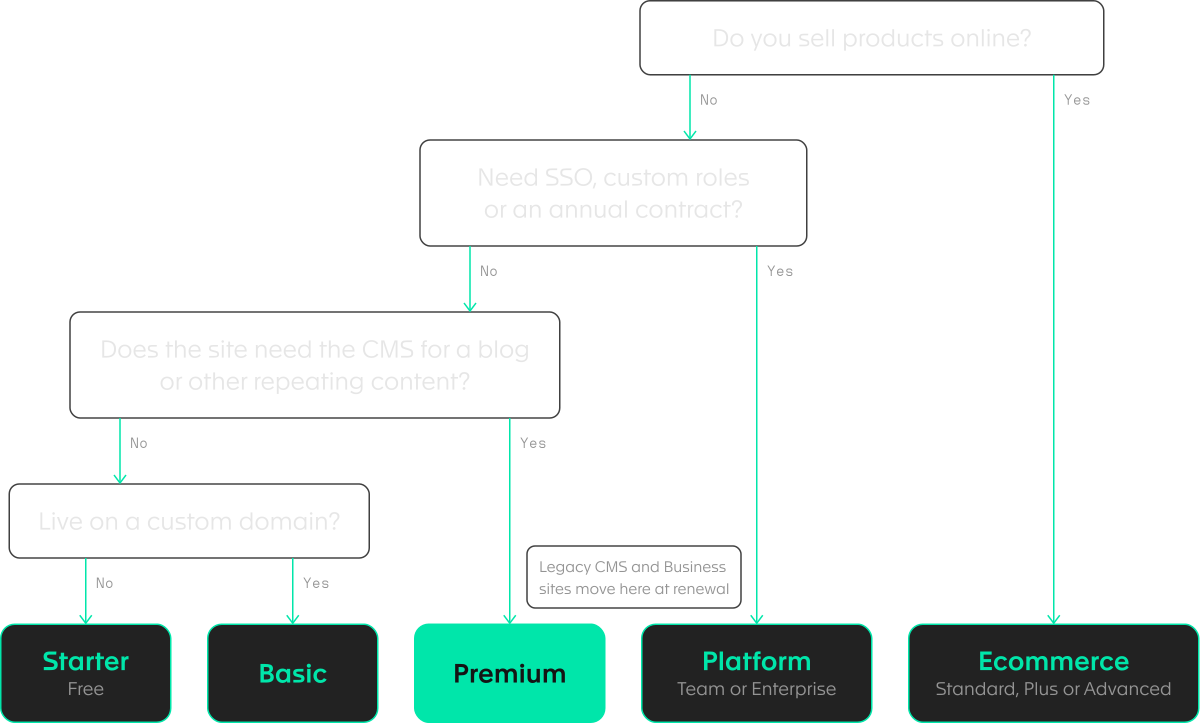
There are three types of Webflow site plans, and the type depends on what the site does. General site plans run websites and blogs, ecommerce plans run online stores, and platform plans bundle a site, a workspace and seats into one annual contract for larger organizations.
The table shows where each site plan type starts.
| Plan type | Plans | Starts at (yearly) | Built for |
|---|---|---|---|
| General | Starter, Basic, Premium | Free | Websites and blogs |
| Ecommerce | Standard, Plus, Advanced | $29/mo | Online stores |
| Platform | Team, Enterprise | $2,500/mo | Larger organizations |
All Webflow pricing comes from their official pricing page and it’s subject to change.
General Site Plans
General Webflow site plans cover every site that doesn't sell products, and the group includes three plans:
- Webflow Starter site plan. It’s free and publishes to a webflow.io address with 2 static pages and 1 GB of bandwidth, which is enough to build and test a site.
- Webflow Basic site plan. It costs $15 a month for simple sites that don't need a CMS, with a custom domain, 300 static pages, and 10 GB of bandwidth.
- Webflow Premium site plan. It costs $25 a month for content sites that run on the CMS, with 20,000 CMS items, and bandwidth you can raise from 50 GB up to 2.5 TB.
Ecommerce Site Plans
Webflow ecommerce plans replace a general site plan when a site sells products, and the group includes three plans:
- Webflow Standard ecommerce plan. It costs $29 a month for up to 500 ecommerce items, and it’s the only one that adds Webflow's 2% transaction fee.
- Webflow Plus ecommerce plan. It costs $74 a month for up to 5,000 ecommerce items, with no Webflow transaction fee.
- Webflow Advanced ecommerce plan. It costs $212 a month for up to 15,000 ecommerce items, with no Webflow transaction fee.
Each ecommerce plan includes hosting, the CMS and a custom checkout, and Stripe or PayPal processing fees apply on top.
Platform Plans
Webflow platform plans sit above the self-serve site plans, are sold on annual contracts, and the group includes two plans:
- Webflow Team plan. It costs $2,500 a month and includes everything in Premium, plus Webflow Localize with 2 locales, publishing workflows, a site activity log, and 24/7 priority support.
- Webflow Enterprise plan. It has no published price and adds single sign-on, SCIM, custom roles, granular permissions, and 99.99% hosting uptime.
Webflow Site Plans vs. Workspace Plans
A Webflow site plan pays for one live site, and a Webflow workspace plan pays for the development team and tools. The two are billed separately. Any workspace plan, including the free Starter workspace, can hold any number of paid site plans, so the workspace never limits how many sites you can publish.
Here's what each covers:
- Site plan: custom domain, hosting, bandwidth, CMS items and static pages for one site
- Workspace plan: staging sites, custom code, Shared Libraries, AI credits and roles across all your sites
- Seats: billed per person on top of the workspace, by what each person does
The split matters for anyone who builds sites for others. A freelancer can keep the free Starter workspace and still run five live client sites, each on their own Basic or Premium site plan, and move to one of the paid Webflow workspace plans only once the staging or collaboration limits get in the way.
What Happened to the Webflow CMS and Business Plans?
Webflow merged the CMS and Business site plans into the Premium site plan. Existing CMS and Business site plan sites move to the new plan at renewal, and sites in Freelancer and Agency workspaces follow from November 16, 2026.
Both legacy site plans included the Webflow CMS, and Premium keeps it, with 20,000 CMS items and bandwidth you can raise as traffic grows, so CMS content carries over to a plan built for it.
For a new site, the choice now comes down to Basic or Premium, and the deciding question is whether the site needs the CMS for a blog, case studies, or any other repeating content.
How to Upgrade, Downgrade, or Cancel a Webflow Site Plan
You change a Webflow site plan from that site's plan settings in Webflow, and you can upgrade, downgrade or cancel at any time. Each change applies to that one site only, so the other sites in your workspace keep their plans. The billing period you chose decides when the change takes effect and what you still pay.
Upgrading a Site Plan
Upgrading a Webflow site plan makes sense when the site outgrows the limits. A Basic site moves to Premium once it needs the CMS, and any site moves to an ecommerce plan once it starts selling.
Bandwidth can also force the move. Webflow lets you know when a site goes over the limit, and with surge protection, two consecutive months over the limit trigger an automatic plan upgrade.
The walkthrough below shows how to upgrade a site from Starter to Premium.
Downgrading a Site Plan
Downgrading a Webflow site plan only works when the site already fits inside the lower plan's limits. Moving from Premium to Basic removes the CMS, so a site with a blog or CMS collections needs a plan for that content before the switch. Check the static page count against Basic's 300 pages as well.
Billing and Cancellation
Webflow bills site plans monthly or yearly, and yearly billing saves up to 40% compared with paying month to month. Cancelling stops the plan from renewing, and on yearly billing the site keeps the plan until the paid term ends.
Because each plan belongs to one site, you can cancel a Webflow subscription for that site and leave the rest of the workspace as it is.
The walkthrough below shows how to cancel a site plan by downgrading it to Starter.
Conclusion
Choosing between Webflow site plans comes down to two decisions. The site plan type depends on what the site does, i.e. a general plan for a website, an ecommerce plan for a store, and a platform plan when your organization needs contracts and governance. The plan inside that type depends on content and scale.
Can you use a custom domain on the free Starter site plan?
No, the free Webflow Starter site plan publishes only to a webflow.io subdomain, such as yoursite.webflow.io. Connecting a custom domain needs a paid site plan, starting with Basic. Starter works well for building and testing a site before launch, since you can upgrade that same site when it's ready to go live.
Does one Webflow site plan cover more than one website?
No, Webflow prices every site plan per site, so each website you publish needs its own plan. A business with a main site and a separate careers site pays for two site plans. The workspace that holds both sites, and the seats of the people editing them, can be shared across all of them.
Is hosting included in a Webflow site plan?
Yes, the Webflow site plan is the hosting plan, so there's no separate hosting bill. Each plan includes delivery through Webflow's global CDN and a monthly bandwidth allowance, from 1 GB on Starter and 10 GB on Basic to 50 GB on Premium, which you can raise as traffic grows.
What happens if a Webflow site goes over its bandwidth?
Webflow lets you know when a site goes over its monthly bandwidth limit. Surge protection covers temporary spikes, such as a launch or a post that takes off. If the site stays over the limit for two consecutive months, Webflow upgrades the plan automatically, so steady growth leads to a higher bill.


Your growth starts with one conversation.
No pitch deck. No pressure. A focused 30-minute call about where you are, where you want to be, and whether we're the right team to get you there.