Webflow Basic Site Plan: Price, Features, and Limits
The Webflow Basic site plan costs $15 a month billed yearly and publishes a simple site to your own domain, with 300 static pages, 10 GB of bandwidth, and unlimited form submissions. Basic has no CMS, so it suits portfolios, landing pages, and small business sites that don't run a blog.
How Much Does the Webflow Basic Site Plan Cost?
The Webflow Basic site plan costs $15 a month billed yearly, or $25 a month billed monthly. Each price covers one site with applicable taxes added at checkout. In the wider picture of Webflow pricing, Basic is the cheapest plan that puts a site on a custom domain.
Yearly billing is cheaper. For example, a Basic site plan on yearly billing costs $180 (12 × $15), against $300 on monthly billing (12 × $25). That’s why yearly billing makes sense for any site you expect to keep live for more than a few months.
Like all Webflow site plans, the Basic site plan cost is per site, so three websites need three Basic plans. Also, each plan comes with the free Starter workspace, which means one site owner pays nothing beyond the site plan itself.
The walkthrough below shows how to put a site on the Basic site plan.
Who Is the Webflow Basic Site Plan For?
The Webflow Basic site plan is for websites with content you update by hand rather than through a CMS. A freelancer portfolio, a small business site, a product landing page, or an event page all fit, because each one has a fixed set of pages and a contact form, and none of them needs to publish new posts every week.
Here's where the Basic site plan fits best:
- Portfolios - a handful of project pages and an about page, updated a few times a year
- Small business sites - services, pricing, team, and contact pages, with unlimited form submissions for leads
- Landing pages - a single campaign or product page on its own domain
- Event pages - a schedule, speakers, and a registration form, live for a set period
A site outgrows the Basic site plan the moment it needs a blog, a case study library, or a job board, since each of those runs on CMS Collections.
Webflow Basic Site Plan Features and Limitations
The Webflow Basic site plan covers what a static site needs to go live on your own domain:
- Publishing
- Hosting
- Forms
- SEO controls
What the Basic Site Plan Includes
The Webflow Basic site plan includes:
- Custom domain, with the "Made in Webflow" badge removed
- 300 static pages
- 10 GB of bandwidth a month, served through Webflow's global CDN
- Unlimited form submissions
- Site password protection
- 301 redirects, sitemap controls, schema markup, and Open Graph tags
- 5 Webflow Cloud apps with 1 million web app requests a month
- Unlimited backups and two-factor authentication
Webflow Basic Site Plan Limitations
The Webflow Basic site plan leaves out:
- Webflow CMS (no CMS items or Collections at all)
- Site search
- Form file uploads
- Code components and well-known files
- Extra bandwidth beyond the included 10 GB, which only the Premium site plan can buy
- Customer success manager (support runs through the Help Center and Support Portal)
The CMS limitation is the biggest one. Even a short news section or a list of team members built from a Collection needs the CMS, so on the Basic site plan those pages have to be built and edited one by one as static pages.
Starter vs. Basic vs. Premium
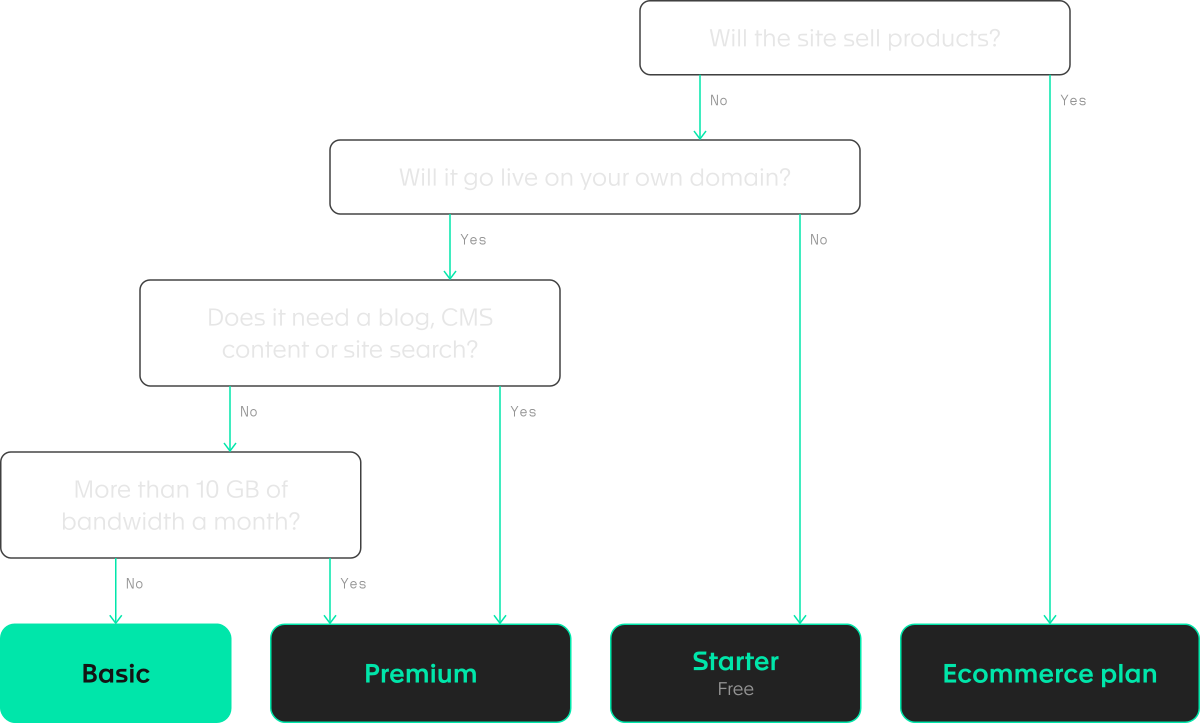
The Webflow Basic site plan sits between the free Starter plan and the Premium site plan. Starter can't publish to a custom domain, and Basic can't run a CMS, which makes Basic the plan for a live static site and Premium the plan for a content site.
| Feature | Starter | Basic | Premium |
|---|---|---|---|
| Price (yearly) | Free | $15/mo | $25/mo |
| Custom domain | No | Yes | Yes |
| Static pages | 2 | 300 | 300 |
| CMS items | 50 | None | 20,000 |
| Bandwidth | 1 GB | 10 GB | Up to 2.5 TB |
When to Upgrade From Basic Site Plan to Premium
You should upgrade the Webflow Basic site plan to the Premium site plan when the site needs CMS content such as a blog or case studies, site search, form file uploads, or more than 10 GB of bandwidth a month. Premium costs $10 a month more on yearly billing and keeps everything Basic includes, so nothing on the site is lost in the move.
A Basic site that starts selling skips Premium and moves to an ecommerce plan, which replaces the site plan and includes the CMS and checkout. Sites still on the old CMS and Business plans land on Premium at renewal, since Webflow merged both into Premium in May 2026. Each plan change applies to one site only, so the other sites in your workspace keep their plans.
The walkthrough below shows how to upgrade a Basic site to Premium.
Conclusion
The Webflow Basic site plan is for a static site that needs a custom domain and nothing more. This plan covers pages, forms, hosting and SEO controls for a small site, and the CMS is the line that sends a site to the Premium plan.
If you’re planning a new site and want help choosing the plan and building it, our Webflow development team can scope both.
Is the Webflow Basic site plan the same as the Core plan?
No, the Webflow Basic site plan pays for one live site, while Core is a workspace plan for the people building sites. The Webflow Core workspace plan costs $19 a month billed yearly and adds more staging sites, custom code and code export. A site can run on Basic without any paid workspace plan.
Does the Webflow Basic site plan remove the Webflow badge?
Yes, the Webflow Basic site plan removes the "Made in Webflow" badge from the bottom right corner of your published site. The badge only shows on sites on the free Starter plan. Every paid site plan, Basic included, publishes without it, so your site carries no Webflow branding.
Does the Webflow Basic site plan support 301 redirects?
Yes, the Webflow Basic site plan includes 301 redirects, along with sitemap controls, schema markup support and Open Graph tags. Redirects matter when you move an existing site to Webflow, since they send old URLs and their search rankings to the new pages. The free Starter plan has no 301 redirects.
Can you password protect a site on the Basic plan?
Yes, the Webflow Basic site plan includes site password protection, which locks the whole published site behind a password. It's useful for client previews, internal pages or a soft launch before you go public. Because the protection covers the whole site, you remove it in one step when the site is ready to launch.
Can a Webflow Basic site host Webflow Cloud apps?
Yes, the Webflow Basic site plan includes 5 Webflow Cloud apps and 1 million web app requests a month. Webflow Cloud hosts apps alongside your Webflow site, and app bandwidth is pooled with the site's 10 GB limit. Premium raises the app limit to 15 and the requests to 2 million a month.


Your growth starts with one conversation.
No pitch deck. No pressure. A focused 30-minute call about where you are, where you want to be, and whether we're the right team to get you there.