Webflow Workspace Plans Guide: Prices, Features, and Limitations
Webflow workspace plans are the account-level plans that decide how many staging sites, collaboration tools, and seats you get. For in-house teams there's Starter, Core, Growth, and Enterprise. For freelancers and agencies there's a Freelancer and Agency workspace plan. Every workspace plan needs a separate site plan on top for publishing a website to your own domain.
What Is a Webflow Workspace Plan?
A Webflow workspace plan sets how many staging sites you can build, what collaboration tools you get, and who can work on what. A site plan is bought for one site and pays for hosting it on a custom domain.
To make more sense between different Webflow pricing, here’s what each one pays for:
- Workspace plan: staging sites on webflow.io, pages per staged site, custom code, code export, roles and seats.
- Site plan: hosting, a custom domain, CMS items, and bandwidth for a single published site.
- Add-ons: AI credits for the whole workspace, plus Localize, Analyze, and Optimize for individual sites.
To clear up the usual confusion, every customer gets one free Starter workspace, and any workspace plan can hold unlimited paid site plans. So you can run a live, paying client site from a free workspace, and you only need a paid workspace plan when your team needs more staging, custom code, or tighter control over who publishes.
Seats are part of the workspace plan as well. Every plan includes one full seat for the owner, and you add Full seats for people who design, Limited seats for people who edit content or build pages from existing components, and Free seats for reviewers who only comment.
Webflow Workspace Plan Prices Compared
Paid Webflow workspace plans cost $16 to $49 a month billed yearly, or $24 to $60 billed monthly. The price is per workspace and covers one full seat, so a single designer pays the listed price and nothing more for the workspace itself. Starter is free, and Enterprise is quoted on request.
Webflow workspace plan prices in 2026, retrieved from Webflow's pricing page. Savings are calculated from the listed yearly and monthly prices.
As for the Enterprise workspace plan, it has no public price. You get a quote from Webflow's sales team.
Starter Workspace Plan
Starter is the free workspace plan every Webflow customer gets. It holds unlimited paid sites and two free staging sites, which suits anyone building one or two sites at a time and paying for a site plan at launch.
Here's what Starter workspace plan includes:
- 2 staging sites on webflow.io
- 2 pages per staged site
- 50 CMS items per staged site
- 200 AI credits a month
- 1 full seat for the workspace owner
- Up to 2 agency or freelancer guest teams of 5 people each, free of charge
If you build for clients on Starter, each paid site comes with one free client seat, so the client can edit their own content.
The limit you'll hit first is the staging cap. Two pages per staged site is enough to test a layout and not much more, and Starter has no custom code or code export.
Webflow Workspace Plans for Teams
In-house teams move from Starter to Core when they need more staging and custom code, to Growth when they need unlimited staging and control over who edits and publishes each site, and to Enterprise when they need custom terms.
Core Workspace Plan
Core costs $19 a month billed yearly or $28 billed monthly, and Webflow pitches it "for more staging needs." Here’s what the Webflow Core workspace plan includes:
- 10 staging sites
- 300 pages per staged site
- Custom code on any page
- Code export to HTML and CSS
- One Shared Library for components and assets
- 300 AI credits/month
Limitations
As the cheapest paid workspace plan for an in-house team, Core leaves out several things:
- Staged sites can't be password protected
- No 301 redirects on staging
- No publishing permissions
Growth Workspace Plan
It costs $49 a month billed yearly or $60 billed monthly, and Webflow pitches it "for unlimited staging and advanced collaboration tools." With that said, here’s what the Webflow Growth workspace plan includes, on top of everything in Core:
- Unlimited staging sites
- Password protection on staged sites
- 301 redirects on staging
- "Made in Webflow" badge removal on staged sites
- Site-specific access and a default role per person on each site
- Publishing permissions that decide who can push a site live
- 400 AI credits/month
- Webflow's customer success team
Limitations
Since Growth workspace plan is built for in-house teams, keep the limitations in mind:
- One Shared Library, same as Core
- No guest access to client workspaces or free client seats, which come with the Freelancer and Agency plans
Enterprise Workspace Plan
Enterprise has no listed price, so the actual figure comes from your conversation with Webflow's sales team. The platform positions it for organizations that need advanced collaboration workflows and room to grow across many sites and teams.
As for Webflow Enterprise workspace plan coverage, it includes all the things you negotiated with Webflow’s sales team and how the contract is put together.
Webflow Workspace Plans for Freelancers and Agencies
Freelancers and agencies get their own workspace plans built around client work. Freelancer workspace plan suits a small client roster and Agency workspace plan a large one. Both plans let you join a client's workspace as a free guest and give clients free seats on the sites you build for them.
Freelancer Workspace Plan
Webflow Freelancer workspace plan costs $16 a month billed yearly or $24 billed monthly, and Webflow aims it at "freelancers with a small client roster." Here’s what it includes:
- 10 staging sites
- Full CMS access on staging
- One free client seat per site
- Guest access in client workspaces
- Client payments, so clients pay for their own site plans
- One Shared Library
- 300 AI credits/month
Limitations
Client seats replaced the legacy Editor, which Webflow switched off on August 4, 2026. As the cheaper of the two plans for client work, Freelancer leaves out:
- More than 10 staging sites
- Site-level roles and publishing permissions
- Password protection and 301 redirects on staging
Agency Workspace Plan
Agency costs $35 a month billed yearly or $42 billed monthly, and Webflow aims it at "agencies with a large client roster." As for coverage, the Webflow Agency workspace plan includes:
- Unlimited staging sites
- Three free client seats per site
- Guest access in client workspaces
- Unlimited Shared Libraries
- Site-level roles and publishing permissions
- Password protection and 301 redirects on staging
- 400 AI credits/month
In May 2026, Webflow merged the CMS and Business site plans into a single Premium site plan, and raised the Basic site plan from $14 to $15 a month billed yearly. Client sites in Freelancer and Agency workspaces move later than other sites.
A CMS or Business site switches to Premium site plan at the next renewal or billable change on or after November 16, 2026, and a Basic site moves to the new Basic price at the same point. Before then, list each client site with their current site plan and renewal date, since together they decide when the change reaches it.
Upgrading and Managing Webflow Workspace Plans
You can upgrade or downgrade a Webflow workspace plan at any time from the Plans tab in your workspace settings, and the same screen handles the switch between yearly and monthly billing.
However, when you change plans partway through a term, Webflow applies a prorated credit for the unused part of your current plan.
Upgrading a Webflow Workspace Plan
Upgrading a Webflow workspace plan takes four steps, and the extra staging sites and features are ready as soon as checkout finishes:
- Open your workspace and go to the Plans tab in its settings.
- Pick the plan you want and choose yearly or monthly billing.
- Click "Upgrade to" followed by the plan name.
- Confirm the payment, and the new limits apply straight away.
Downgrading a Webflow Workspace Plan
Downgrading a Webflow Workspace plan starts from the same Plans tab, however, the workspace has to fit inside the lower plan's limits first.
Moving from Core to Starter, for example, means cutting down to 2 staging sites, either by deleting the extras, publishing them on a site plan, or transferring them to another workspace.
Billing
Every paid workspace plan can be billed monthly or yearly, and the toggle sits in the upper right of the plans section. Yearly billing saves between 17% and 33% depending on the plan, as the price table above shows.
You can cancel at any time, but you keep paying for the rest of the current term, so on yearly billing the plan stays active until the year runs out.
How to Choose the Right Webflow Workspace Plan
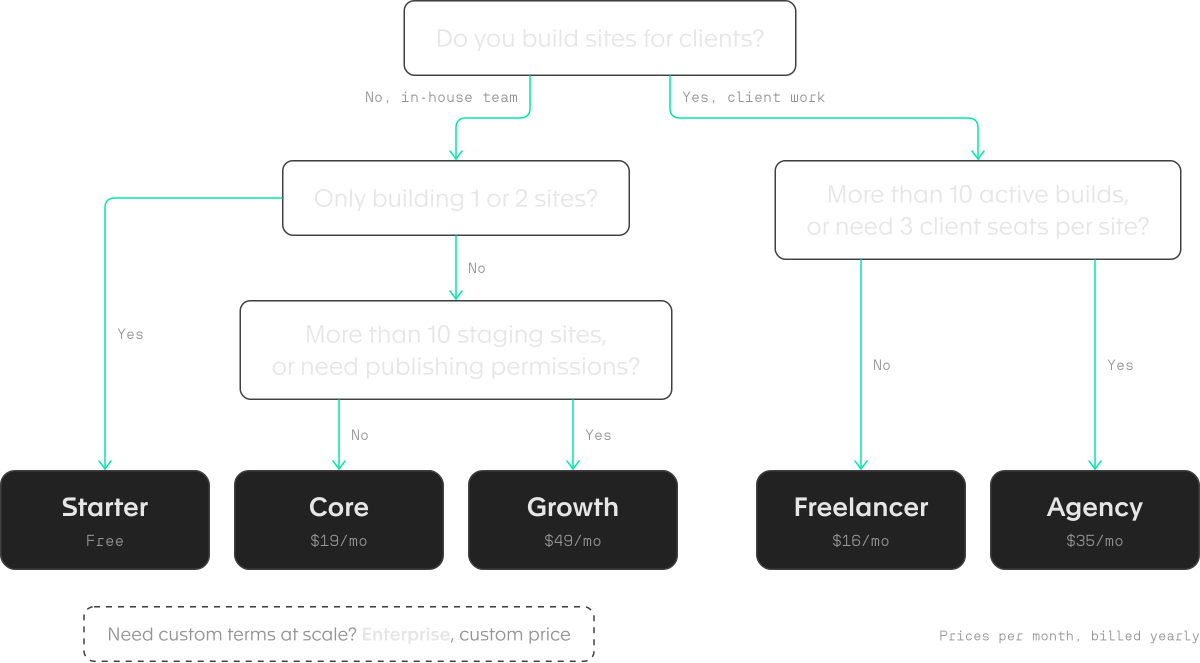
For a small in-house team, Core is the plan we'd start on, because 10 staging sites, custom code and code export cover the usual workload of a marketing site and a few landing pages. Move to Growth once you need more than 10 staged sites, or the moment you need to control who can publish.
If you build for clients, the decision runs on the same two things, staging and control. Freelancer handles up to 10 active builds with one client seat per site. Agency makes sense once you pass 10 builds, need three client seats per site, or have a team that needs roles and publishing permissions across client projects.
Conclusion
When deciding on a Webflow workspace plan, answer this question first: Do you build sites for your own company or for clients? Then pick the plan that covers how many sites you build at the same time and whether you need to control who can publish them.
In-house teams choose between Starter, Core, Growth and Enterprise, while freelancers and agencies choose between Freelancer and Agency. If you're planning a Webflow site development or migrating to Webflow, our team can help you choose the right workspace and site plans from the start.
What's the difference between a workspace plan and a Team plan?
The difference between a workspace plan and Team plan is that a workspace plan covers your team's staging and collaboration, while Team is a platform plan that bundles a site, a workspace, Localize and other add-ons in one annual contract from $2,500 a month.
Do you need a paid workspace plan to publish a site?
No, you don't need a paid workspace plan to publish a site on your own domain. The site plan handles publishing, and even the free Starter workspace can hold unlimited paid sites. A paid workspace plan only matters when you need more staging, custom code, client tools, or publishing permissions.
How much does an extra seat cost on a Webflow workspace plan?
An extra Full seat costs $39 a month billed yearly or $45 monthly, a Limited seat costs $15 or $19, and a Free seat for reviewers costs nothing. A five-person team on Growth pays $49 for the plan plus 4 × $39 for seats, which comes to $205 a month billed yearly before any site plans.
What's the difference between a Full seat and a Limited seat?
A Full seat can design whole sites and manage admin settings, while a Limited seat can edit content and build pages from existing components without changing the design. Limited seats suit marketers and writers who publish content, and at $15 a month billed yearly they cost well under half the price of a Full seat.
Do guests and client seats count as paid seats?
No, guests and client seats don't use your paid seats. A workspace can add up to 2 agency or freelancer guest teams of 5 people for free, and client seats come free with each site: 1 per paid site on Starter, 1 per site on Freelancer and 3 per site on Agency. Inviting collaborators to a Webflow workspace works differently for each.
Do Webflow workspace plans include AI credits?
Yes, every Webflow workspace plan includes monthly AI credits pooled across all the sites: 200 on Starter, 300 on Core and Freelancer, and 400 on Growth and Agency. When a workspace runs out, a pack of 2,000 extra credits costs $20 a month billed yearly or $25 billed monthly.
Are Localize, Analyze, and Optimize part of a workspace plan?
No, Localize, Analyze, and Optimize are add-ons that attach to a paid site plan, so you buy them per site rather than per workspace. Analyze starts at $9 a month billed yearly and Optimize at $299, while Webflow Localization pricing depends on how many locales and translated words a site needs.


Your growth starts with one conversation.
No pitch deck. No pressure. A focused 30-minute call about where you are, where you want to be, and whether we're the right team to get you there.