Webflow Growth Workspace Plan: Pricing, Features, and Limits
The Webflow Growth workspace plan costs $49 a month billed yearly or $60 billed monthly. It's the top self-serve workspace plan for in-house teams, built in Webflow's words "for unlimited staging and advanced collaboration tools." It adds unlimited staging, password protection, and 301 redirects on staged sites, and control over who can open and publish each site on top of everything in Core.
How Much Does the Webflow Growth Workspace Plan Cost?
Webflow Growth workspace plan costs $49 a month billed yearly, which comes to $588 a year, or $60 billed monthly, which comes to $720. The price is per workspace and includes one Full seat for the owner, so yearly billing saves $132 a year, about 18% of the monthly rate.
A workspace plan pays for building, staging and collaboration, and a site plan pays for hosting one live site, so on top of the $49 you'll pay for:
- A site plan for each site that goes live on a custom domain, at $15 a month for Webflow Basic site plan or $25 for Premium billed yearly ($25 or $39 monthly).
- A seat for every extra person who designs or edits; $39 a month billed yearly for a Full seat ($45 monthly), or $15 for a Limited seat ($19 monthly).
- Extra AI credits, if your team uses up the monthly allowance.
Core vs. Growth vs. Enterprise Workspace Plan
The gap between Webflow Core workspace plan and Growth comes to $360 a year on yearly billing. For that you get unlimited staging sites instead of 10, password protection and 301 redirects on staging, and site access, roles and publishing permissions that Core doesn't have. Webflow Enterprise plan adds single sign-on, SCIM, and custom roles at a custom price.
What the Webflow Growth Workspace Plan Includes
The Webflow Growth workspace plan includes everything in Core, from custom code and code export to 300 pages per staged site, and adds the staging and access controls that Core leaves out. The two biggest changes are unlimited staging and the ability to decide who opens and publishes each site.
On top of Core, Webflow Growth workspace plan includes:
- Unlimited staging sites
- Staging password protection
- 301 redirects
- Site-specific access
- Site-level roles
- Publishing permissions
- 400 AI credits a month
That said, let’s examine each one in more detail.
Unlimited Staging, Password Protection and Redirects
The Growth plan gives you unlimited webflow.io staging sites, where Core stops at 10, and each staged site holds up to 300 pages. Published sites no longer count against the staging limit, so Core's limit only matters while work is still in progress, but a team running a redesign, a campaign microsite and a handful of landing page tests at the same time uses up 10 slots quickly.
Also, staged sites on Webflow Growth workspace plan can be password protected, which keeps an unreleased campaign or rebrand private until launch day. They get 301 redirects too, so the redirect map for a redesign can be built and tested while the new site is still in staging.
The walkthrough below shows how to password-protect a staged site and publish it so the password takes effect.
Site Access, Roles and Publishing Permissions
Site-specific access decides which sites each teammate or guest can open, site-level roles set a default role for each person on each site, and publishing permissions decide who can push which site live. Together they let a junior designer work on a campaign site without being able to publish the main marketing site, and Webflow's guide to seats and roles lists what each seat type can change.
Handing routine updates to the people who own the content is the usual reason to set roles up. On a Growth workspace, that kind of handover runs through site-level roles and publishing permissions, which decide which editors can push a change live.
Who Should Use the Growth Plan?
The Webflow Growth plan fits an in-house team that has outgrown Core, either because the team works on more sites than Core's 10 staging slots hold or because publishing needs to sit with specific people. Growth is the right call once any of these three things is true:
- You have more than 10 sites in staging at once
- Staged work needs to stay behind a password before launch
- Only some people on the team should be able to publish each site
If none of these applies, Core does the same job for $19 a month.
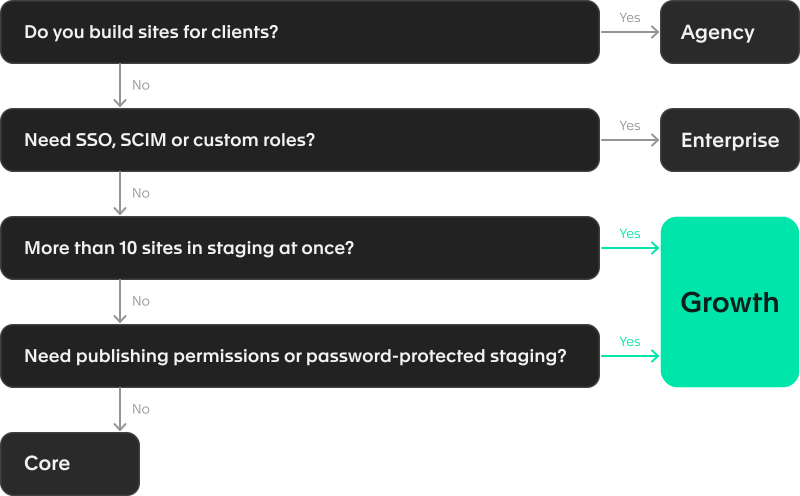
For small teams, the deciding factor is who publishes. A team of three who share one marketing site and all publish to it fits Core, while a team where designers, writers and a marketing lead touch the same sites gets more from Growth's publishing permissions than from its extra staging.
Teams that build sites for clients get client seats and client payments on the Webflow Agency workspace plan instead, and organizations that need single sign-on or custom billing terms are an Enterprise conversation.
Limitations of the Growth Workspace Plan
The Growth plan's biggest gap is hosting. A Growth workspace can stage unlimited sites, but none of them goes live on a custom domain until it has its own paid site plan, so a team with three live sites pays for three site plans on top of the $49.
Other limitations of the Growth workspace include:
- Credit card billing
- Support comes through the Help Center and Support Portal, with no customer success manager
- Single sign-on, SCIM, custom roles and page-level access controls aren't included, since Webflow keeps them for Enterprise
- No client seats or client payments, which sit on the Freelancer and Agency plans
- Code export leaves out CMS content, which has to be exported separately, collection by collection
Conclusion
The Growth workspace plan makes sense once an in-house team outgrows Core, whether that means more work in staging, staged sites that need a password, or a team that needs control over who publishes. A team that still fits inside 10 staging sites and lets everyone publish gets the same building tools on Core for $30 a month less.
Whichever workspace plan you choose, each live site still needs its own site plan, so hosting grows with the number of sites you publish. If you're planning a new site or a move to Webflow, our Webflow development team can set up the workspace and site plans with you.
Is the Webflow Growth plan the same as a Webflow growth partner?
No, the Webflow Growth plan is a workspace plan you buy from Webflow, and a Webflow growth partner is an agency that keeps improving a live site after launch. The two names overlap in search, but one is a line on your Webflow bill and the other is a team working on your site month after month.
Does the Growth plan remove the Webflow badge?
Yes, the Growth plan removes the "Made in Webflow" badge from webflow.io staging sites, which Starter workspace plan and Core can't do, so a campaign preview sent to leadership looks like the finished site. Published sites work differently, because there the site plan removes the badge, from Basic upward, whichever workspace plan the site sits in.
Does the Growth plan include more Shared Libraries than Core?
No, the Growth plan includes one Shared Library, the same as Core. A Shared Library holds the components, variables and assets that every site in the workspace can use, and teams that want a separate library for each brand or product line only get unlimited Shared Libraries on the Agency workspace plan.
Can you upgrade from Core to Growth at any time?
Yes, Webflow lets you upgrade a workspace plan at any time. The plan itself costs $30 a month more billed yearly, and seats you already pay for stay at the same $39 Full and $15 Limited rates on both plans.
Can you cancel the Webflow Growth plan at any time?
Yes, you can cancel the Webflow Growth plan at any time. If the team still builds in staging, downgrading to Core is the cheaper middle step, since Core keeps 10 staging sites, custom code and code export for $19 a month billed yearly, against 2 staging sites on the free Starter workspace.


Your growth starts with one conversation.
No pitch deck. No pressure. A focused 30-minute call about where you are, where you want to be, and whether we're the right team to get you there.