Webflow Agency Workspace Plan: Pricing, Features and Limits
The Webflow Agency workspace plan costs $35 a month billed yearly or $42 billed monthly, and it's the top Webflow subscription for agencies. It adds unlimited staging, three free client seats per site, site-level roles, and publishing permissions on top of everything in Freelancer.
How Much Does the Webflow Agency Workspace Plan Cost?
Webflow Agency workspace plan costs $35 a month billed yearly, which comes to $420 a year, or $42 billed monthly, which comes to $504. The price is per workspace and includes one Full seat for the owner, so yearly billing saves $84 a year, about 17% of the monthly rate.
Agency workspace pricing covers building, staging and collaboration. Hosting is billed per site, because a workspace plan and a site plan pay for different things, and on top of the $35 you'll pay for:
- A site plan for each client site that goes live on a custom domain, at $15 a month for Basic or $25 for Premium billed yearly ($25 or $39 monthly).
- A seat for every extra person who designs or edits: $39 a month billed yearly for a Full seat ($45 monthly), or $15 for a Limited seat ($19 monthly).
- Extra AI credits, if your team uses up the monthly allowance.
Starter vs. Freelancer vs. Agency Workspace Plan
Starter is the free workspace every account begins on. The gap between Freelancer and Agency comes to $228 a year on yearly billing, and what triggers the upgrade is capacity and control.
With the Webflow Agency workspace plan, you get unlimited staging sites instead of 10, three client seats per site instead of one, unlimited Shared Libraries instead of one, and site-level roles and publishing permissions that Freelancer doesn't have.
What the Webflow Agency Workspace Plan Includes
The Webflow Agency workspace plan includes everything in Freelancer workspace plan, plus the following:
- Unlimited staging sites
- 3 free client seats per site
- Client payments, carried over from Freelancer
- Unlimited Shared Libraries
- Site-level roles
- Publishing permissions
- Staging password protection
- Webflow 301 redirects
- 400 AI credits/month
Let’s examine these in more detail.
Unlimited Staging and Shared Libraries
The Agency plan gives you unlimited webflow.io staging sites, where Freelancer stops at 10. Each staged site holds up to 300 pages with full CMS access, so a client build can be finished and filled with real content before anyone buys a site plan.
Shared Libraries go from one on Freelancer to unlimited on Agency. A Shared Library holds components, variables, and assets that every site in the workspace can use, so you can keep one starter kit and a separate library per client brand.
Client Seats, Guests and Client Payments
Every site in an Agency workspace comes with three free client seats, whether the site is staged or paid, against one per site on Freelancer. A client seat lets someone on the client's team update that one site without a paid seat, and Webflow's guide to seats and roles lists what each seat type can change.
Agency and freelancer guests, up to two teams of five, can join your workspace for free without using seats, and comment-only links let reviewers leave feedback without a Webflow account.
Client payments, carried over from Freelancer, let a client add their own card so their site plan is billed to them while the site stays in your workspace.
Roles, Permissions and Site Controls
Webflow Agency workspace plan is the only plan for freelancers and agencies with site-level roles and publishing permissions. Site-level roles set what each teammate or guest can do on each site, and publishing permissions control who can push a site live, which matters once a junior designer and a client share the same project.
The walkthrough below shows how to set a site role and a publishing permission for one teammate.
Also, staged sites get password protection and 301 redirects, so you can set and test the redirect map while the site is still in staging. Site transfer, carried over from Freelancer, is how a finished build moves into the client's own workspace.
Limitations of the Agency Workspace Plan
The main limitation of any workspace plan, including Agency plan, is that it doesn't publish anything by itself. Every client site needs a paid Webflow site plan before it can go live on a custom domain. The workspace plan pays for building, staging and collaboration, and hosting is always a separate line on the bill.
Other limitations of the Agency workspace include:
- Credit card billing
- Support comes through the Help Center and Support Portal, with no customer success manager
- Single sign-on, SCIM and custom roles aren't included, since Webflow keeps them for Enterprise workspace plan
- Code export leaves out CMS content, so an exported client site loses its collections
- Every extra designer or editor on your own team is a paid seat
Who Should Use the Agency Plan?
Webflow for agencies comes down to the Agency plan once any of three things is true:
- You have more than 10 sites in staging at once
- Clients need more than one editor per site
- Your team needs roles and publishing permissions across client projects
If any of these doesn't apply, Freelancer does the same job for $16 a month.
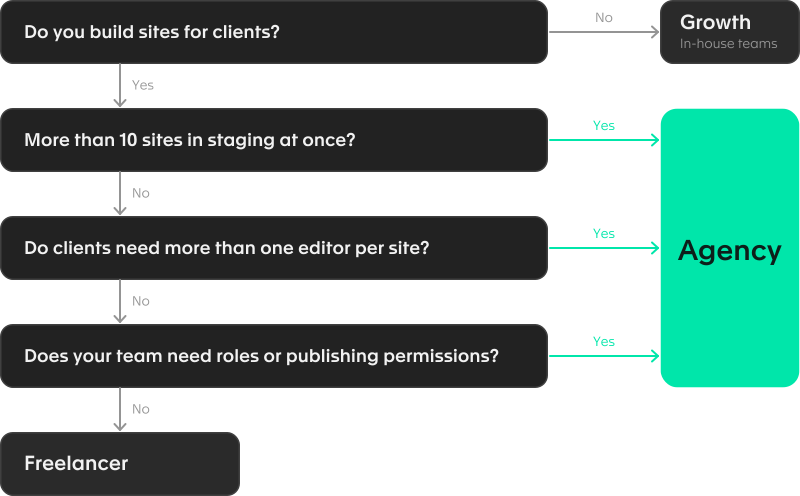
The 10-site limit is the one agencies hit first, since a pitch, two builds in progress and a couple of redesign concepts take up Freelancer's staging fast. Published sites no longer count against the staging limit, though, so a studio that launches quickly can stay on Freelancer longer than its client count suggests.
In-house teams with no clients get the same roles and publishing permissions on the Growth workspace plan at $49 a month billed yearly, but Growth leaves out client seats and client payments.
Conclusion
The Agency workspace plan makes sense once client work outgrows Freelancer, whether that means more builds in staging, more people on the client side who need to edit, or a team that needs control over who publishes. Until then, Freelancer covers the same ground for less. Whichever workspace plan you choose, each live client site still needs its own site plan, so the hosting bill grows with your client list.
Can you join a client's Webflow workspace on the Agency plan?
Yes, the Agency plan lets your whole workspace join a client's Webflow workspace as a guest, and Freelancer allows the same. Guests don't take one of the client's paid seats, so the client pays nothing extra for your team to work on their site, and your designers keep working from their own workspace logins.
Does the Agency plan remove the Webflow badge?
The Agency plan removes the "Made in Webflow" badge from staged webflow.io sites, which Starter and Freelancer can't do, so client previews look finished before launch. On a published site the badge comes off through the site plan, from Basic upward, so a live client site loses it whichever workspace plan hosts it.
What changes for sites in Agency workspaces on November 16, 2026?
From November 16, 2026, sites hosted in Freelancer and Agency workspaces move to Webflow's new site plans at renewal. The retired CMS and Business site plans become Premium at $25 a month billed yearly, and legacy Basic is repriced at $15 a month billed yearly, so check each client site against Webflow pricing before its next renewal date.
Can you upgrade from Freelancer to Agency at any time?
Yes, Webflow lets you upgrade a workspace plan at any time, so you can move from Freelancer to Agency the day you need an 11th staging site or a second client seat. Your sites, staging and team stay in the same workspace, and only the plan and its limits change.
Can you cancel the Webflow Agency plan at any time?
Yes, you can cancel the Webflow Agency plan at any time, but you still pay the rest of the term you signed up for. On yearly billing the plan stays active, and billed, until the year runs out, so cancelling early doesn't bring the cost down. Client sites keep their own site plans either way.


Your growth starts with one conversation.
No pitch deck. No pressure. A focused 30-minute call about where you are, where you want to be, and whether we're the right team to get you there.