Webflow Ecommerce Pricing: Plans, Fees, and What You Get
Webflow ecommerce pricing comes in three plans, including Standard at $29 a month billed yearly ($42 monthly), Plus at $74 ($84 monthly), and Advanced at $212 ($235 monthly). Each one replaces a regular site plan for a store and includes hosting, the CMS, and a custom checkout, while Stripe or PayPal processing fees come on top.
How Much Do Webflow Ecommerce Plans Cost?
The Webflow Standard ecommerce plan costs $29 a month billed yearly or $42 billed monthly. Plus costs $74 yearly or $84 monthly, and Advanced costs $212 yearly or $235 monthly. Each price covers one store. The 2% Webflow transaction fee applies only on Standard, so Plus and Advanced charge nothing per sale beyond your payment processor's fee.
Here’s a quick breakdown of Webflow ecommerce pricing:
Ecommerce items count products, variants and categories, with every product using at least two, and they sit apart from your CMS item limit, so a blog on the same site doesn't eat into the catalog. Stripe or PayPal processing fees apply on every plan, on top of any Webflow fee, as listed on Webflow's pricing page.
Yearly billing saves the most on Standard, where $29 against $42 comes to $156 a year, or about 30%. On Plus the saving is $120 a year (about 11%), and on Advanced it's $276 a year (about 9%), so a store that expects to stay on Standard for a while gets the biggest return from paying upfront.
Standard vs. Plus vs. Advanced: Which Webflow Ecommerce Plan Is Best?
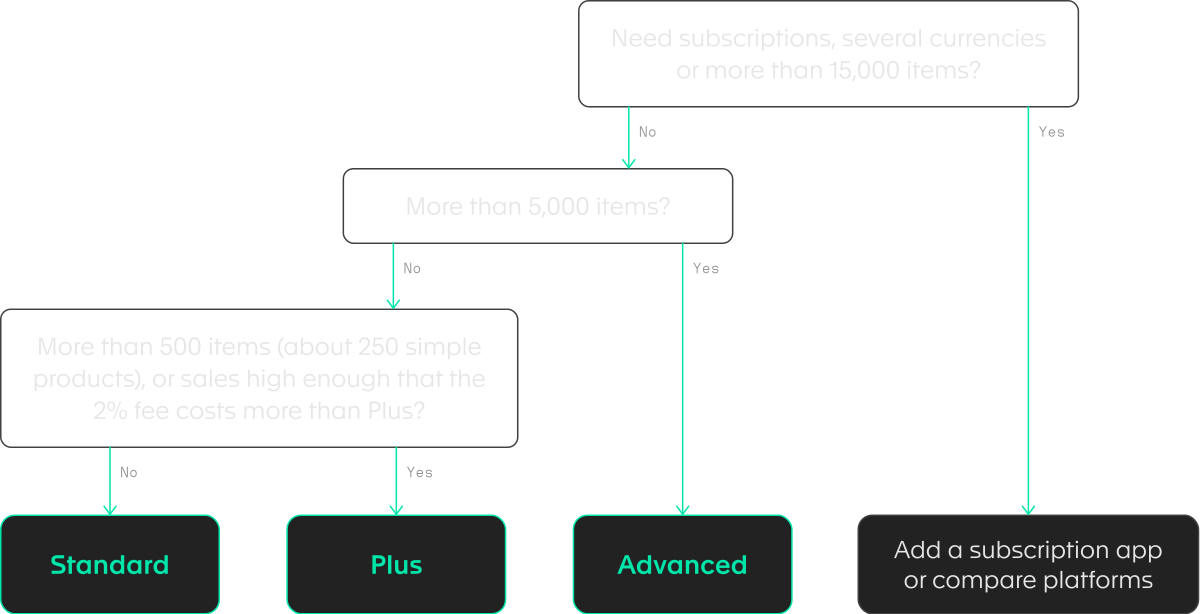
When comparing Webflow ecommerce plans, the right one depends on your catalog size and monthly sales. The Webflow Standard ecommerce plan fits a new store with a small catalog and modest sales, while Plus fits once the catalog or the monthly revenue outgrows it. Advanced costs almost three times as much as Plus but only adds room for 15,000 items and 15 staff accounts, so it's a catalog-size decision more than a feature one.
Item limits hold fewer products than they suggest, because every product counts as two items: one for the product and one for its default SKU. Each size and color combination also gets its own SKU, and a product can carry up to 50 variants across three option sets, so a shoe in 11 sizes and 5 colors (55 combinations) won't fit on a single product.
Webflow Standard Ecommerce Plan
The Webflow Standard ecommerce plan costs $29 a month billed yearly or $42 billed monthly, and it's built for stores that are just getting started. The plan includes:
- 500 ecommerce items, or about 250 simple products
- 2,000 CMS items across 20 Collections
- 150 static pages
- 50 GB of bandwidth a month
- 3 staff accounts
Limitations
- A 2% Webflow transaction fee on every sale, on top of Stripe or PayPal fees
- Webflow branding in the footer of order emails
- No file uploads through forms
- Site search re-indexes only every 72 hours, which is slow for daily stock updates
- The store's Products, Categories and SKUs Collections take 3 of the 20 Collections
The 2% fee is the limitation that decides how long a store stays on Standard. Plus costs $45 a month more billed yearly, so once a store sells more than about $2,250 a month, the fee costs more than the upgrade would. At $5,000 a month in sales, Standard costs the $29 plan plus $100 in fees, or $129, while Plus costs a flat $74, a saving of $660 a year. On monthly billing the break-even point drops to $2,100 in monthly sales.
Webflow Plus Ecommerce Plan
The Webflow Plus ecommerce plan costs $74 a month billed yearly or $84 billed monthly, for stores whose sales or catalog have outgrown Standard. It includes everything in Standard, plus:
- 5,000 ecommerce items, or about 2,500 simple products
- No Webflow transaction fee
- Up to 10,000 CMS items across 40 Collections
- 300 static pages and 100 GB of bandwidth a month
- 10 staff accounts, so in-house editors can update products without touching the design
- Unbranded transaction emails and form file uploads of up to 10 MB
- Site search re-indexing every 12 hours
Limitations
- 5,000 items fill up quickly once variants are counted: about 227 products in 5 sizes and 4 colors
- The 10,000 CMS item ceiling is the same as on Advanced, so a large blog behind the store has no room to grow by upgrading
Webflow Advanced Ecommerce Plan
The Webflow Advanced ecommerce plan costs $212 a month billed yearly or $235 billed monthly, $138 more than Plus, for large catalogs and bigger teams. It includes everything in Plus, plus:
- 15,000 ecommerce items, or about 7,500 simple products
- 15 staff accounts
Everything else, from CMS items and bandwidth to fees and emails, matches Plus.
Limitations
- 15,000 items is the ceiling for any Webflow store, with no higher tier to move to
- CMS items stay at 10,000, while a $25 Premium site plan has had 20,000 since May 2026
- Bandwidth stays at 100 GB, and ecommerce plans can't add the bandwidth add-on that Premium sites can buy
What Every Webflow Ecommerce Plan Includes
Every Webflow ecommerce plan includes the same payment options:
- Stripe
- PayPal
- Apple Pay alongside other browser-based web payments
Each plan calculates sales tax and VAT automatically for the U.S., Canada, the EU and Australia, though filing and paying that tax stays with you, and no plan caps your sales volume. The plan you pick only changes your limits, and the yearly sales caps that older reviews still quote no longer exist.
Also, ecommerce plans carry the SEO tools of Webflow's other site plans, including 301 redirects, an auto-generated XML sitemap, Open Graph tags, and structured data support, which matters for product pages that need to rank on their own.
The rest of the store toolkit is the same on Standard, Plus and Advanced:
- A custom checkout page and shopping cart you design yourself
- Order emails with product details and your own colors, logo and text
- Custom shipping rules with different rates for each region
- Google Shopping product sync
- Meta events for Facebook and Instagram campaigns
- Mailchimp sign-ups from Webflow forms
- Custom code for anything the built-in integrations don't cover
Is Webflow Good for Ecommerce?
Webflow is good for ecommerce when a store's catalog fits within 15,000 items and the brand wants full design control of the storefront, cart and checkout, with the CMS and SEO settings in the same tool.
Webflow is a weaker fit for stores built on subscriptions, stores that sell in several currencies, catalogs above that limit, or operations that depend on a large app marketplace.
The strength is that the store and the rest of the site are one project. Product pages, a blog, lookbooks and landing pages share the same CMS, components and design, and the checkout and cart are built in the Designer like any other page, so a brand-led store doesn't end up looking like a template with a logo swapped in. Also, buying guides and product pages are on one domain and link to each other, which is where Webflow's SEO strengths pay off for a store.
Subscriptions are the clearest gap. Webflow switched off User Accounts on January 29, 2026, which ended its native gated content and member features. Webflow's own listing for Monto Simple Subscriptions says a Webflow Ecommerce checkout charges a customer once, so recurring billing needs an app layered on top.
Catalog size is another hard limit, since 15,000 items on Advanced is the ceiling, which works out to about 7,500 simple products once each default SKU is counted. For a store that weighs these limits against a commerce-first platform, the Webflow vs. Shopify comparison covers the trade-off in apps, fees and design control.
Add-ons and currencies are the less obvious limits. Webflow doesn't allow site add-ons on ecommerce plans, so a store can't buy Localize, Analyze, Optimize or extra bandwidth, and on sites that run both Localize and Ecommerce, products, categories and store pages can't be translated. A store also runs in one currency, set before the first product is added, so selling in several markets at local prices takes an app or a separate site for each market.
Conclusion
Picking a Webflow ecommerce plan comes down to how many items your catalog uses once variants are counted, and how much you sell each month. Catalog size decides between Plus and Advanced, while the transaction fee on Standard decides how soon a growing store should move to Plus.
Every plan shares the same checkout, payment options and marketing integrations, so the choice never takes a feature away from your customers.
Can you remove ecommerce from a Webflow site?
No, once ecommerce is enabled on a Webflow site, its product Collections and pages can't be fully removed. A site that no longer sells can still move to a regular Webflow site plan, but checkout has to be turned off first in Settings, under Ecommerce and then Checkout, before Webflow allows the plan change.
Can you add ecommerce to an existing Webflow site later?
Yes, an existing Webflow site can switch to an ecommerce plan at any time from its plan settings, and the site's pages, CMS content and design stay in place. That lets a brand launch its content on a general site plan first and open the store once the products are ready.
Do you need a paid workspace plan to run a Webflow store?
No, the free Starter workspace plan can hold unlimited paid sites, so the ecommerce plan is the only cost a store needs at the start. Paid Webflow workspace plans add staging sites, custom code and extra collaboration features, and extra seats for designers or editors are billed separately.
Is Webflow ecommerce cheaper than Shopify?
It depends on what a store sells and how, because the total monthly cost includes the plan, any transaction fee, payment processing and the apps each platform needs. A small store on Webflow Standard pays the 2% fee, while a store on Plus pays none, so compare the full monthly bill at your real sales volume.


Your growth starts with one conversation.
No pitch deck. No pressure. A focused 30-minute call about where you are, where you want to be, and whether we're the right team to get you there.