Webflow vs. WordPress: Comparison in 2026
Webflow vs. WordPress comparison comes down to who runs your website day to day. If you want to ship landing pages, campaigns and content without waiting for a developer, Webflow is a better choice for a B2B site. However, WordPress wins when you need deep custom functionality, a content library far beyond 20,000 items, or full control over hosting.
Webflow vs. WordPress at a Glance
| Webflow | WordPress | |
|---|---|---|
| Platform type | Hosted visual builder | Open-source CMS |
| Starting cost | $25/mo (Premium, yearly) | Free software + hosting |
| Maintenance | Handled by Webflow | Your team |
| Extensibility | Apps and custom code | Large plugin library |
| Best fit | Marketing-led sites | Custom, large builds |
Webflow is a closed, hosted platform. You design pages visually in the Designer, structure content in CMS Collections, and publish to Webflow's own hosting, all on one platform. However, in this case, one company controls the roadmap, the hosting and the price list, which is convenient until the pricing changes.
On the other hand, WordPress is software you install on a server you choose. Your theme controls the design, plugins add features, and your team needs to keep all of it updated. WordPress runs about 40% of all websites, and this reach means that there's a huge pool of developers and plugins, as well as attackers. This is important to mention in light of the most recent PHP vulnerability.
Overall, Webflow trades some flexibility for speed and less upkeep. Conversely, WordPress trades upkeep for near-unlimited flexibility.
Neither is "better" in the abstract, so let’s take a look at what actually decides for a marketing team, including workflow, cost, performance, risk, and migration.
Webflow vs. WordPress Differences for a B2B Marketing Team
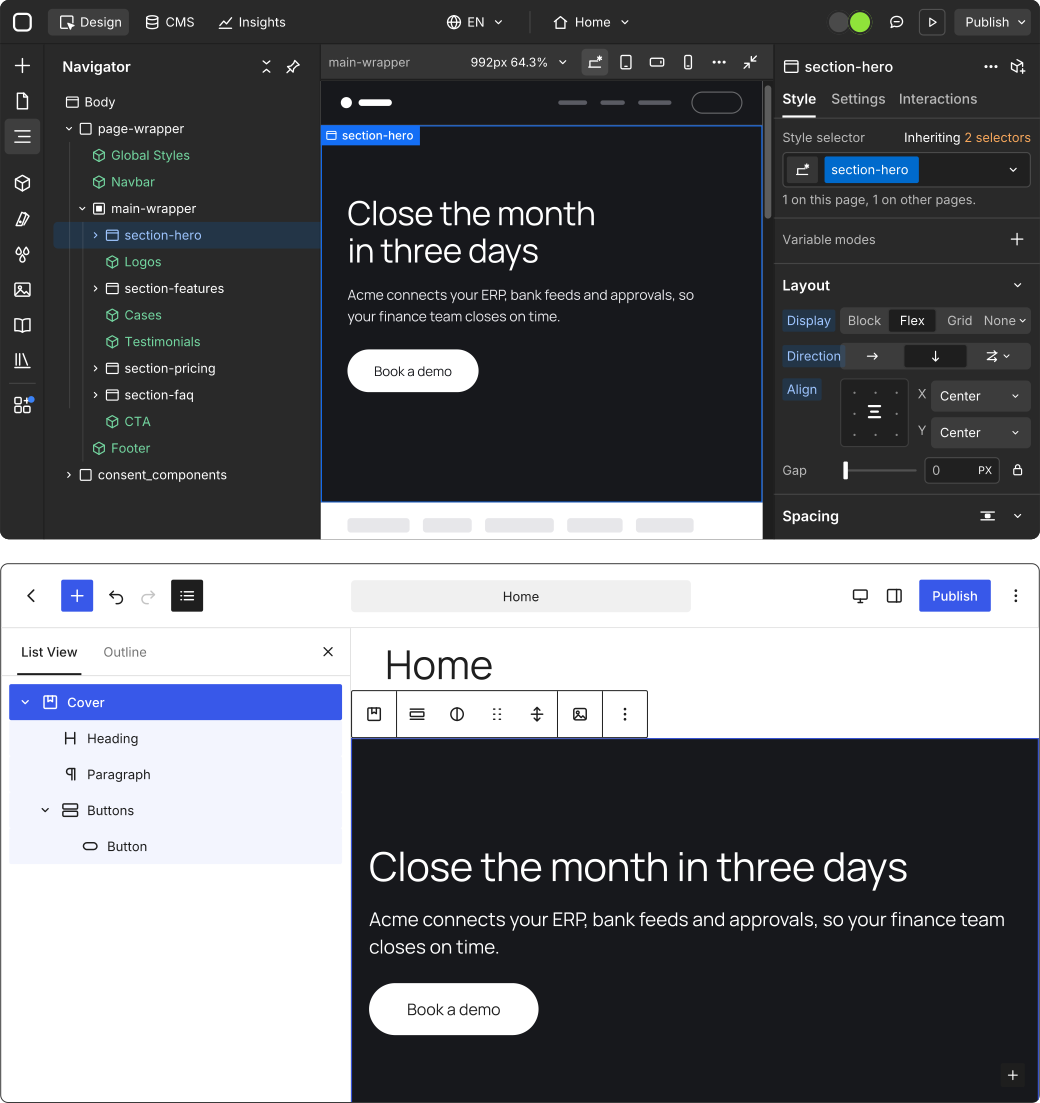
For a B2B marketing lead, the real difference between Webflow and WordPress is who can change the site and how fast. Webflow lets designers and marketers build and publish whole pages visually, while WordPress usually splits the work between editors in the block editor and developers who own the theme and plugins.
Publishing Content
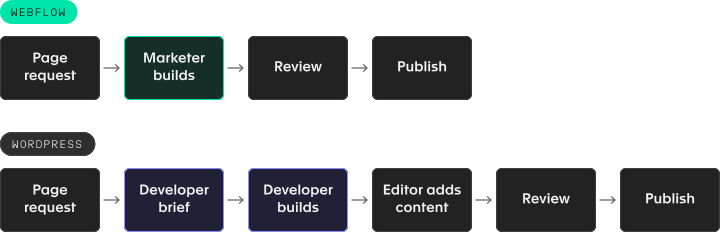
On Webflow, a marketer with a full seat can build a new page from the site's existing components, connect a form and publish it, all inside the Designer. Limited seats cover content editing, which suits writers and product marketers who update copy and CMS items but don't build layouts.
On WordPress, editors publish posts and standard pages easily in the block editor. New layouts are another story. If your site runs on a custom theme, a page that needs a section the theme doesn't have becomes a developer ticket. Page-builder plugins solve that for marketers, but they add their own code, their own updates and their own licence.
Speaking in terms of numbers, Forrester interviewed five Webflow customers in 2024, who reported a 94% decrease in time to market for content management development and 80% more efficient content corrections and changes.
Roles, Reviews, and Approvals
Since May 2026, Webflow prices editing access by seat. A full seat costs $39 a month, a limited seat $15 a month, and free seats cover reviewers and commenters who only leave feedback.
Setting people up takes a few minutes, and inviting collaborators in Webflow works the same way for in-house staff and agency guests. Granular permissions, custom roles and advanced governance are Enterprise features, so a mid-size team on self-serve plans works with broader roles.
On the other hand, WordPress comes with five built-in roles:
- Administrator
- Editor
- Author
- Contributor
- Subscriber
They cover who can publish and who can only draft, and any formal approval chain (legal sign-off, brand review, scheduled publishing gates) comes from plugins.
As for collaboration, WordPress 7.0 introduced a range of improvements, but real-time collaborative editing was removed shortly before launch. The feature was pulled on May 8 because of concerns about race conditions, server load, memory efficiency, and recurring bugs, as explained in the WordPress core team's announcement.
They revisited the approach during the 7.1 development cycle, and the September update on a server-aware approach to collaboration proposed a way to address those issues. However, if your team expects several people to edit the same WordPress page live, don't assume native real-time collaboration is available yet.
Forms, CRM, and Lead Routing
Webflow connects to HubSpot through a native app. It maps Webflow form fields to HubSpot contact properties without code, adds site-wide tracking, deploys HubSpot chat, and can embed HubSpot forms that you style visually in Webflow.
WordPress has official plugins from HubSpot, Salesforce and nearly every marketing tool you'd name. Because you control the code, deeper custom lead routing (enrichment before CRM sync, conditional routing by company size, custom objects) is easier to build on WordPress. On Webflow, the same logic usually runs through the API, Zapier or Make.
As for Webflow vs. HubSpot trade-offs, they are different since HubSpot bundles the CRM with the website. If you’re already on HubSpot CMS and plan to leave, have a separate checklist for a HubSpot to Webflow migration. Nevertheless, measurement is the same on both platforms; adding Google Analytics to Webflow is a script in site settings, and on WordPress it's a plugin or a theme edit.
A/B Testing and Personalization
Webflow sells A/B testing and personalization as a native add-on called Optimize. It runs inside the platform, so tests use the same pages and components your team already edits.
WordPress has no native testing. Teams use a third-party tool or plugin, which gives you more choice of vendor and one more script, one more contract and one more thing to check after every plugin update.
Webflow vs. WordPress Pricing
Webflow costs a predictable subscription, from $25 a month per CMS site billed yearly plus $39 a month for each full editing seat. WordPress software is free, but hosting, premium plugins, maintenance and developer time decide the real number, and that number moves every time something breaks.
With that said, here’s how Webflow vs. WordPress pricing compares:
| Cost line | Webflow | WordPress |
|---|---|---|
| Software | Included in plan | Free (open source) |
| Site plan or hosting | $15/mo Basic, $25/mo Premium | From $28/mo |
| CMS items included | 20,000 on Premium | Set by your host |
| Editing seats | $39 full, $15 limited, free reviewers | No seat fees |
| Workspace | $19/mo Core, $49/mo Growth | Not needed |
| Theme or design | Built in the Designer | Premium theme or page builder licence |
| Plugins and add-ons | Localize from $9/mo, Optimize from $299/mo | Yearly licence per plugin |
| Extra bandwidth | +50 GB for $20/mo | Depends on hosting plan |
| Ecommerce | $29 to $212/mo per store | WooCommerce free, plus extensions |
| Security and updates | Included | Your team, agency or host |
| Team plan / enterprise | $2,500/mo Team, Enterprise custom | Managed hosting from $400/mo (WP Engine Business) |
| Example: 3 page builders | $152/mo ($1,824/yr) | Quote each line above |
Predictable vs. Hidden Costs
Webflow's extra costs are visible on the price list, and they grow with the team. Seats scale per person, bandwidth beyond the plan's allowance costs extra (an added 50 GB on Premium is $20 a month billed yearly), and Localize, Optimize and AI credits are separate add-ons.
For example, a B2B team of three marketers who all build pages in Webflow would pay for one Premium Site plan ($25), a Growth Workspace ($49) with its one included full seat, and two extra full seats ($39 each). That's $152 a month, or $1,824 a year, billed yearly, before any add-ons.
On the other hand, WordPress's extra costs sit off the price list. Plugin licences renew every year, emergency fixes arrive without warning, a security incident costs cleanup time and lost leads, and staging environments often need a higher hosting tier.
For the WordPress side of the same comparison, get real quotes for these items:
- Hosting plan with staging
- Theme or page builder licence
- Each premium plugin's yearly licence
- Monthly maintenance retainer or internal hours
- Budget for unplanned developer fixes
Webflow vs. WordPress: Speed, SEO, and AI Search Visibility
Both Webflow and WordPress can rank well in Google, and the difference is how much work it takes to get there. Webflow ships fast, clean defaults that a marketing team can't easily break, while a WordPress site can match or beat it, but only if the hosting, theme and plugins are chosen and maintained with speed in mind.
Core Web Vitals
A Core Web Vitals by CMS study found that 54.4% of Webflow sites passed mobile Core Web Vitals against 38.4% of WordPress sites.

Those are averages across every site on each platform, including abandoned blogs and overloaded themes on cheap hosting. A well-built WordPress site on good hosting can beat both numbers. The averages tell you where each platform lands when nobody is watching performance closely, which is a fair description of a busy marketing team.
Page weight matters more than platform. For instance, when we rebuilt the site for Sheer's international marketing push, the new build came out 93% lighter and scored 100 on SEO.
Technical SEO
Many wonder whether Webflow is good for SEO. It covers the core technical SEO settings natively, including title and meta fields per page and per CMS template, an automatic XML sitemap, 301 redirects, canonical tags, and custom code slots for schema. Built properly, it outputs clean, semantic HTML.
WordPress gets most of the SEO controls from plugins such as Yoast SEO or Rank Math, which are very flexible. Many teams that migrate from WordPress to Webflow ask what replaces their plugin, and replacing Yoast in Webflow is mostly a matter of using fields that already exist plus a content checklist.
Content volume is where WordPress pulls ahead. Webflow Premium caps the CMS at 20,000 items. That's plenty for a blog, a resource library and a case study section. However, it gets tight for large directories or location pages.
AI Citations
Neither platform gets your pages cited in ChatGPT, Gemini or Google's AI answers by itself. What gets cited is content with clear structure, self-contained paragraphs and named, sourced facts, and both Webflow and WordPress can get you there.
Webflow bundles AEO agents into the Team plan, while WordPress relies on plugins and editorial discipline. In both cases the editorial work is the bigger lever, and that’s where good SEO and GEO services come in.
Webflow vs. WordPress: Security, Maintenance, and Compliance
Webflow handles hosting, SSL, platform updates and DDoS protection for you, while on WordPress security is your team's job, and the risk sits mainly in plugins. For a team without a developer, that's often the deciding factor.
WordPress counted 11,334 new vulnerabilities in 2025, up by 42% compared to 2024. Plugins accounted for 91% of them and themes for 9%, with only six found in WordPress core. And 46% had no developer fix by the time they were disclosed publicly, which means your site can be exposed with no patch to install. A small plugin stack, kept updated, reduces the risk a lot, and someone still has to own that job every week.
Webflow runs on AWS infrastructure with Cloudflare's CDN, and the hosting page lists automatic SSL certificates, DDoS and bot protection, automatic backups, and SOC 2 Type II, CCPA and GDPR compliance. Enterprise customers get a 99.99% uptime SLA, and the Team plan lists 99.90% application and 99.00% hosting uptime on the pricing page. There are no plugins to patch, because there are no plugins in the WordPress sense.
As for data portability, WordPress content is fully portable; you can export it, move hosts or rebuild the front end without losing anything. Webflow lets you export CMS Collections as CSV files, and Workspace plans from Core upward include code export. Exported code is static, though, so CMS-driven pages don't stay dynamic outside Webflow.
Webflow vs. WordPress: Which Platform to Choose
Choose Webflow when marketing owns the website and you want speed with low maintenance, and choose WordPress when you need custom functionality, very large content volumes or full control over hosting.
Webflow
Choose Webflow if:
- You don't have an in-house WordPress developer, and you don't want to rent one on retainer just to keep the site patched.
- You ship landing pages and campaigns every week or two.
- Your brand depends on design, and the site has to look exactly like the Figma files.
- You want hosting, SSL and security handled by the platform.
- Your content fits within 20,000 CMS items.
- You need a few languages, and Webflow Localization covers them without a second site.
When we redesigned the site for Finmatics, organic clicks rose 40% and demo submissions doubled. That's the kind of result you can keep building on, because you can test and ship pages without a release cycle.
WordPress
Choose WordPress if:
- You run membership areas, customer portals or custom app logic on the marketing site.
- Your content library is far beyond 20,000 items, or growing fast toward it.
- You have a strong in-house WordPress team and a site that already performs well. Migrating a site that works is a cost with little upside.
- Legal requires hosting in a specific country or on your own infrastructure.
- Ecommerce is central to the business, and WooCommerce's ecosystem fits it better than Webflow's ecommerce plans.
Final Thoughts
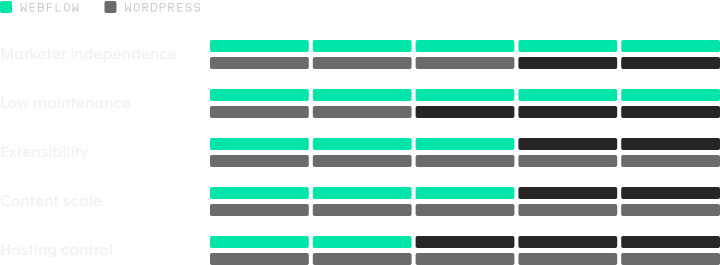
Overall, if you’re aiming for product launches, campaigns, pricing updates and a growing content library, Webflow development for B2B and SaaS fits well since your site changes often. WordPress fits builds that need custom functionality, very large content volumes or hosting under your own control, but you need a developer to maintain it.
The wrong choice won’t show at the start, but six months later. This might be a backlog of page requests waiting on a developer, or a maintenance bill that keeps growing with every plugin. To make the right choice, price both platforms with your real team size, your real plugin list, and your real publishing pace.
Is Webflow harder to learn than WordPress?
No, Webflow isn’t harder to learn for people who only edit content. However, building pages in the Webflow Designer takes longer to learn because it follows web layout logic such as boxes, classes, and flexbox.
Can I move my WordPress blog to Webflow?
Yes, you can migrate WordPress to Webflow. Export your posts to CSV, import them into a Webflow CMS Collection, then fix images, embeds and internal links the import misses. Plan a 301 redirect for every old URL. Plugins and theme features don't transfer, so list what each plugin does and replace it before launch.
Do I need a developer to run a Webflow site?
No, you don’t need a developer to run a Webflow site. You can publish, edit, and build pages from existing components without code. However, you do need a Webflow developer for the initial build, complex interactions, custom code and integrations that go beyond the native apps.
Can I use WordPress and Webflow together?
Yes, you can use WordPress and Webflow together. Some teams run the marketing site on Webflow and keep a blog, documentation or resource hub on WordPress, usually on a subdomain, or on a subfolder through a reverse proxy. It means maintaining two systems, though.
Which platform is better for a SaaS website?
For a typical SaaS marketing site, Webflow is better, because launches, pricing pages and campaign pages change often and marketing can ship them without engineering.


Your growth starts with one conversation.
No pitch deck. No pressure. A focused 30-minute call about where you are, where you want to be, and whether we're the right team to get you there.