Is Webflow Good for SEO? Strengths, Limits, and Setup
Yes, Webflow is good for SEO. You control the title, meta description, URL slug, alt text and redirects on every page, and the hosting side is handled for you, including SSL and the sitemap. What Webflow won't do is rank the site for you. There's no plugin marketplace to lean on either, so anything past the basics comes down to your own setup and a little custom code.
Key Takeaways
- Webflow gives you page-level control of titles, meta descriptions, slugs, alt text and 301 redirects, with no plugin required for any of it.
- SEO settings are per page only, there is no global switch.
- The built-in Audit panel runs four accessibility checks; it doesn’t look at rankings, keywords or content, so it isn’t an SEO audit.
- CMS collection pages generate their own titles and descriptions from a pattern, which is what makes a few hundred blog posts manageable.
- Platform choice doesn't decide rankings.
What Webflow Handles Natively for SEO
Webflow covers the technical SEO basics without any setup from you, including hosting, SSL, the CDN and an auto-generated sitemap that updates when you publish. That removes a bunch of problems that affect a lot of self-hosted sites, like an expired certificate or a sitemap nobody regenerated after a content push.

Clean Code and Fast Hosting
Webflow hosting runs on Amazon Web Services and sites are delivered over the Fastly network, so you're not sizing a server or choosing a CDN. The markup is yours to shape, and that matters more than it sounds. You pick the heading levels and the semantic elements in the Designer, so a badly structured page is a design decision rather than something your theme did to you.
Automatic SSL and Sitemaps
Free SSL comes with Webflow hosting, and the auto-generated sitemap carries a <lastmod> value for every URL showing when that page was last published. Webflow also adds the sitemap address to your robots.txt for you.
However, the timestamp only moves when you republish, so a content edit saved and left unpublished won't show a fresh date. You can switch auto-generation off and paste in your own XML instead, and once /sitemap.xml exists, it can't be deleted.
On-Page SEO Controls in Webflow
Every page carries its own SEO title, meta description, Open Graph fields and URL slug. CMS template pages build theirs from a pattern, so each item gets a unique one. Webflow recommends keeping titles under 60 characters and sets no limit on the description, though search engines will cut a long one.
The pattern part is the piece people miss. On a collection template you click Add field and pull the item's name or category straight into the title tag. That's how 300 blog posts end up with 300 distinct titles and nobody writes them twice.
That same mechanism is what makes programmatic SEO in Webflow workable on a CMS rather than a spreadsheet of static pages.
There's no site-wide default to fall back on, though. You can't set SEO settings globally, so a page launched without a title tag stays without one until somebody opens that page's settings. On a 70-page build, that becomes a checklist item.
Webflow SEO Limitations
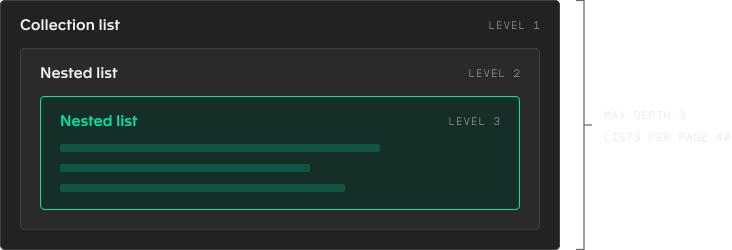
Webflow SEO limitations are real and they're mostly about scale and anything non-standard. However, none of them stop a marketing site from ranking, and all of them cost time if you find out late, including:
- No plugin ecosystem. There's no Yoast-style panel reading your copy and scoring it. The upside is no plugin conflicts and nothing to update; the trade is that you bring your own process for keyword mapping, internal linking and content checks.
- Structured data goes in custom code. Webflow has no field for schema, so JSON-LD is in the custom code section of page settings. That field takes 10,000 characters per page and 20,000 site-wide. Fine for an Article or Organization block, not so when every CMS item needs its own values pulled from fields.
- CMS display caps. A collection list shows up to 100 items by default, with a limit of 40 lists per page and nesting three levels deep. Your total item and collection allowance comes from the site plan.
- Redirects need a paid plan and some discipline. Webflow doesn't cap the number of 301 rules but recommends staying under 1,000. Rules fire in the order you added them, so a broad wildcard sitting above a specific rule will swallow it.
Webflow vs. WordPress vs. Custom Builds for SEO
The platform doesn't decide rankings. Content, links, and technical work do, and all three platforms can be set up well or badly. What changes between them is how much of the technical work is handed to you and how much you assemble yourself.
So the honest answer to whether Webflow sites rank better than custom builds is that they don't, inherently. A custom build can do anything Webflow does and more, given the engineering time. However, Webflow's advantage is that you can ship a page with correct tags on a Tuesday without a deployment, and that advantage compounds over a year of publishing.
If you're weighing the move from one specific platform, the differences between Webflow and WordPress come down to the same split, i.e. fewer moving parts against less raw flexibility.
Plugins and Tools for Webflow SEO
Webflow has no SEO plugin marketplace, so the native settings cover the on-page work and everything else happens in tools outside the platform. In practice that means a crawler, Search Console and a rank tracker, same as any other stack.
The one native checker is the Audit panel, and it runs four accessibility checks:
- Missing alt text
- Empty links
- Skipped heading levels
- Duplicate element IDs
This is useful, and worth clearing before launch, but it doesn't read your content, check your titles or know what you rank for. Also, it skips anything inside components and won't check alt text on CMS-bound images, which is exactly where a blog template leaves holes.
The wider set of Webflow SEO tools fills that in. If you’re looking for a familiar scoring panel for your team, a Yoast integration for Webflow brings the content analysis into the editor.
How to Set Up Webflow for SEO
Building an SEO-friendly website in Webflow is mostly a question of doing these in order, because a few of them are painful to retrofit once the site is live and indexed. So, make sure to:
- Set titles and meta descriptions on every static page. There's no global default, so an empty field stays empty.
- Build the title pattern on each CMS template before you add items, using Add field so each item inherits its own.
- Fix the heading structure in the Designer. One H1 per page and no skipped levels, which the Audit panel will flag for you.
- Add alt text, including on CMS image fields. The panel won't catch those, so they need a manual pass.
- Publish, then connect Search Console and Analytics and submit the sitemap Webflow generated.
- Set your 301 redirects in Site settings > Publishing, specific rules above wildcards.
- Add JSON-LD in the page's head code field for the templates that need it.
- Clear the Audit panel and work through the remaining accessibility fixes in Webflow that it doesn't check, like color contrast.
For multilingual sites, Webflow sets the language code per locale automatically and includes hreflang tags in the auto-generated sitemap for static and dynamic pages. Leave the site-wide language code field empty if you're running locales, since a value there overrides the per-locale codes.
The pre-launch items that only matter once, like indexing settings and the robots.txt check, belong to a longer Webflow SEO checklist.
Webflow SEO in Practice
The platform gives you a clean starting point. The setup is what moves the numbers, and a migration shows that most clearly, because everything changes in one day.
For example, Finmatics' move off HubSpot put 70 pages into Webflow in 12 weeks. That came with a full URL map and redirect plan, German copy written from scratch, and a blog audit that merged or removed redundant posts first. Organic clicks rose 40% and average CTR 75% in the first two months after launch.

On the other hand, Calda's site has been rebuilt three times since March 2024, 30 or more pages each time. The technical SEO foundations carried across every version with no SEO regression, and organic clicks were up 70% year over year. Three redesigns is the kind of thing that usually costs a site its rankings.
Conclusion
Webflow is good for SEO because it hands you the controls that matter and takes the infrastructure work off your plate. It's limited in the places where you'd want a plugin to do your thinking. A site that ranks on Webflow got there through structure, content and redirects, in that order.
We take this on as ongoing SEO work on Webflow builds, starting with an audit of what the current setup is costing you in search.
Is Webflow good for blog SEO?
Yes. Blog posts live in a CMS collection, and the template generates each post's title tag, meta description and slug from its fields. Every post gets unique metadata without anyone writing it twice. Add categories and authors as reference fields, since those become collection pages of their own.
Does Webflow support multilingual SEO?
Webflow Localization sets each locale's language code automatically and adds hreflang tags to the auto-generated sitemap for static and dynamic pages. If you switch to a custom sitemap, you add those tags yourself. Keep the site-wide language code field empty, because a value there overrides every locale-specific code.
Does Webflow's SEO audit replace a full SEO audit?
No. The Audit panel runs four accessibility checks: missing alt text, empty links, skipped heading levels and duplicate IDs. It doesn't review titles, content, internal links, rankings or site speed, and it skips components and CMS-bound images. Treat it as a pre-launch accessibility pass rather than an audit.
Do I need a Webflow SEO specialist or agency?
For a small site, the native settings and a checklist get you most of the way. Outside help pays for itself on migrations, where a redirect map protects existing rankings, and on CMS structures that have to hold a few hundred items. The third case is content, where somebody has to ship the pages every month.
How do I keep Webflow SEO healthy after launch?
Check Search Console coverage monthly for pages that dropped out of the index. Add a 301 every time a slug changes, since editing a CMS item's name can change its URL. Republish after content edits so the sitemap timestamp updates, and re-run the Audit panel after any template change.


Your growth starts with one conversation.
No pitch deck. No pressure. A focused 30-minute call about where you are, where you want to be, and whether we're the right team to get you there.