Webflow Enterprise Pricing and Plans: Everything You Need to Know
Webflow Enterprise pricing requires a sales quote for every contract. The plan includes everything in Team, plus granular permissions, custom roles, single sign-on, SCIM, a dedicated account manager, and 99.99% hosting uptime.
How Much Does Webflow Enterprise Cost?
The cost of Webflow Enterprise isn’t public. You get a custom price from Webflow's sales team. The quote changes with what your organization needs, because these limits are listed as "Custom":
- Full and limited seats (Team includes five of each)
- CMS items and static pages
- Bandwidth for your published sites
- Locales for Webflow Localize
- AI credits for Webflow AI features
- Content management API rate limits
- Webflow Cloud usage for hosted apps
Billing works differently on Webflow Enterprise too. Webflow site plans are paid by credit card, while an Enterprise contract comes with custom billing, a master services agreement (MSA), and service level agreements (SLAs).
Seats are where Webflow Team and Enterprise costs pull away from smaller setups. A design team of three on a self-serve workspace pays per seat, and the Webflow workspace plans cover that tier, while Team and Enterprise bundle seats into the contract.
Webflow Team vs. Enterprise: Which Platform Plan Fits?
Webflow sells two platform plans. Webflow Team is built for teams that need control without much setup, and Webflow Enterprise is built for organizations that need a fully custom configuration. Enterprise keeps everything in Team and adds governance, identity management, higher limits and stronger uptime and support commitments.
Webflow Team Plan
The Webflow Team plan costs $2,500 a month on an annual contract and includes everything in Webflow's Premium tier, plus collaboration and publishing tools for a larger team.
The Webflow Team plan includes:
- Webflow Localize with 2 locales
- AEO agents for AI search recommendations
- Publishing workflows and single-page publishing
- Page branching for designers working in parallel
- A site activity log with API access
- 5 full seats and 5 limited seats
- 20,000 CMS items, 100 Collections and 500 static pages
- 24/7 priority support
Limitations
- No single sign-on, JIT provisioning or SCIM
- No custom roles, granular access controls or design approvals
- No private staging or custom staging domain
- Terms of Service only, with no MSA
- Hosting uptime of 99.00%
Webflow Enterprise Plan
The Webflow Enterprise plan includes everything in Team, plus enterprise-ready scale and a configuration built around your organization's rules for who can edit, approve, and publish.
The Webflow Enterprise plan covers:
- Custom roles and access controls down to single pages and CMS Collections
- Design approvals before changes go live
- An audit logs API for compliance and monitoring
- Private staging and a custom staging domain
- Site configuration and Workspace management APIs
- Custom limits on seats, CMS items, pages and bandwidth
- A dedicated account manager
Limitations
- No public price, so budgeting waits for a sales quote
- A dedicated customer success manager, solutions architect, and phone support need the Premium SLA
- Contract terms are set with Webflow sales, so plan for a procurement cycle
Webflow Enterprise Security, Uptime, and Support
Webflow Enterprise adds what IT, legal, and procurement teams usually ask for:
- Single sign-on with just-in-time (JIT) provisioning
- SCIM sync with your identity provider
- MSA with SLAs
- 99.99% hosting uptime for published sites
For comparison, Webflow Team guarantees 99.00% hosting uptime, while application uptime for the Webflow Designer is 99.90% on both plans.
The other big gap between the two Webflow platform plans is support response time. On Webflow Enterprise, response to a major incident is within an hour and a minor one within four hours, against 12 and 24 hours on the Team plan. The Premium SLA adds a dedicated customer success manager, a solutions architect, and phone support on top of that.
Several security features ship with both plans. Webflow Team and Enterprise both list HSTS, custom SSL certificates and custom security headers, and Webflow will help either plan complete a vendor security questionnaire during procurement.
Access control is where Webflow Enterprise pulls ahead for larger content teams. Custom roles and page-level permissions let a legal reviewer approve a pricing page without touching the homepage. Teams on lower plans work with Webflow's standard roles, which you set when you invite collaborators to a Workspace.
Who Needs the Webflow Enterprise Plan?
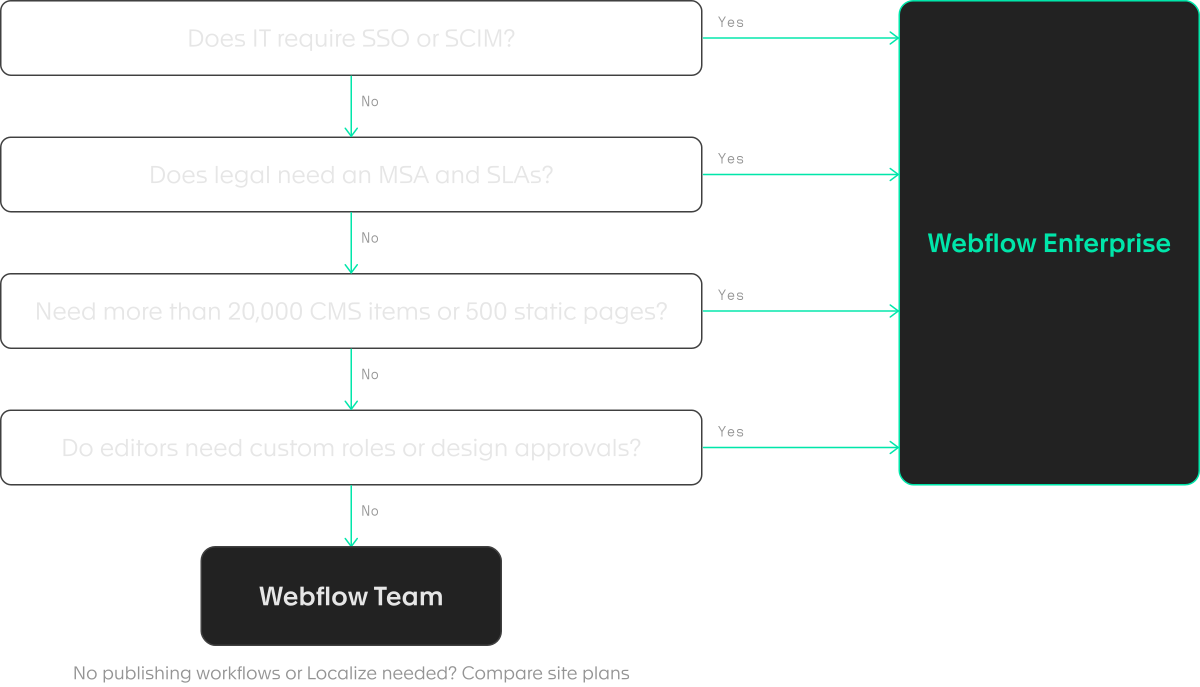
Webflow Enterprise fits organizations where IT or legal sets the requirements for the website, such as single sign-on or SCIM, a signed MSA, an uptime commitment above 99.00%, or page-level edit permissions. A marketing team that needs none of those gets the same Designer, CMS, and hosting on Webflow Team or a site plan.
With that said, keep the following requirements in mind when choosing between Webflow Enterprise and the Team plan:
- Identity requirements. If your IT team requires every tool to sit behind your identity provider, Webflow Enterprise is the only Webflow plan with single sign-on, JIT provisioning, and SCIM.
- Contract and uptime requirements. A procurement team that needs an MSA, SLAs, or 99.99% hosting uptime in writing can only get them on Webflow Enterprise, since Team runs on Webflow's Terms of Service.
- Scale. Webflow Team caps a site at 20,000 CMS items and 500 static pages. Sites built on programmatic SEO, large resource libraries, or multi-region content can pass those limits, and Webflow Enterprise sets them per contract.
- Many editors. When dozens of people edit one site, custom roles and design approvals keep each team inside its own pages, and Webflow Enterprise is where those controls live.
How to Get a Webflow Enterprise Quote
You can get a Webflow Enterprise quote by contacting Webflow's sales team. The conversation moves faster when you arrive with the numbers the quote depends on, because Webflow sets seats, CMS limits, bandwidth, and add-ons separately in each contract.
- Count the full, limited and free seats your team needs.
- List every site and every locale you plan to run.
- Pull monthly bandwidth and CMS item counts from your current site.
- Collect your IT team's identity and security questionnaire requirements.
- Agree internally on the uptime and support response times you need.
- Ask which add-ons, such as Webflow Localize and Webflow Optimize, the contract covers.
The plan fee and the cost of building the site are separate budgets, and both depend on this list. Bring it to your enterprise Webflow agency, so the build, migration, and publishing workflows are scoped against the same seats, locales, and limits as the Webflow contract.
Conclusion
Webflow Enterprise pricing comes down to requirements more than to a number. Webflow Team is the published platform plan, and Webflow Enterprise is quoted on top of it for organizations that need single sign-on, custom roles, contract terms, and a higher uptime commitment.
If you're planning a move from WordPress to Webflow, or any other platform, and want help sizing it, contact our team.
Does Webflow support HSTS?
Yes, Webflow lists HSTS under security on both the Team and Enterprise plans, alongside custom SSL certificates and custom security headers. HSTS forces browsers to connect over HTTPS, which protects visitors from downgrade attacks. Site plans get HSTS too, since Webflow turns it on automatically for every non-Enterprise site and it can't be switched off.
Does the Webflow Enterprise price include building the site?
No, the Webflow Enterprise price covers the platform, hosting, seats, and support. Webflow development is a separate cost, and the price depends on page count, CMS structure, integrations and locales.
Do you need a Webflow partner to buy Enterprise?
No, Webflow Enterprise is bought directly through Webflow's sales team, and the contract sits between your organization and Webflow. A partner agency like Tunel Studio comes in for the build, the migration from your old platform, and setting up roles, staging, and publishing workflows so your team can run the site after launch.
Does Webflow Enterprise include Webflow Optimize?
Webflow Optimize, the A/B testing and personalization add-on, is optional on the Team plan and custom on Webflow Enterprise. Optimize also has its own Enterprise tier, sold through Webflow sales, which connects to the Enterprise platform's staging, uptime SLA, and support. Ask for Optimize to be scoped in the same quote.
What happened to Webflow's Enterprise site and workspace plans?
Webflow now sells Enterprise as a platform plan next to Team, so one contract covers your sites, seats, and support. Older guides describe a separate Enterprise site plan and Enterprise workspace with fixed limits, and those limits no longer apply. Use Webflow's current Team and Enterprise table when you compare plans.


Your growth starts with one conversation.
No pitch deck. No pressure. A focused 30-minute call about where you are, where you want to be, and whether we're the right team to get you there.